
In this blog, I’ll provide a short and clear explanation of how you can create your own AI agent.
I’ll walk you through a comprehensive Python guide for building AI agents using the Microsoft Agent Framework.
Building an AI agent is a large topic, but at a high level, it can be understood in a simple and practical way.
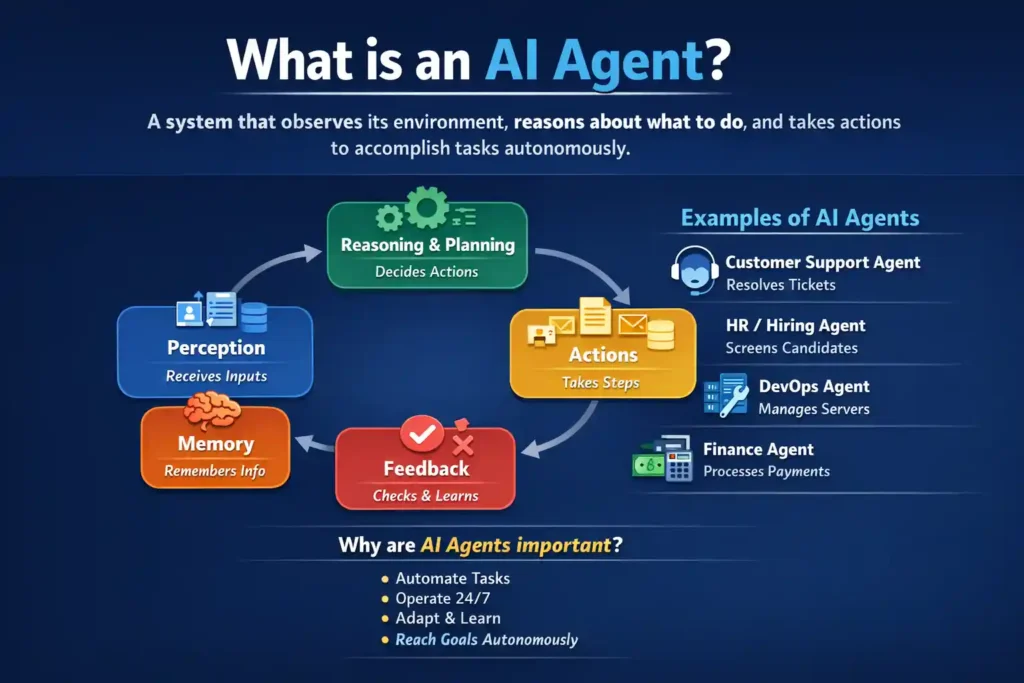
What is an AI Agent:
An AI agent is a system that observes its environment, reasons about what to do, and takes actions to accomplish tasks, often repeatedly and autonomously.
Step-by-Step Python Guide
1. Installation
# Install the full framework (recommended for learning)
pip install agent-framework --pre

# Or install only core (lighter)
pip install agent-framework-core --pre

# For Azure AI integration
pip install agent-framework-azure-ai --pre
2. Prerequisites
- Python 3.10 or later
- An API key from OpenAI or Azure OpenAI
- Azure CLI installed and authenticated (
az login) if using Azure
3. Simple Agent Example
Here’s a basic joke-telling agent:
import asyncio
from agent_framework.azure import AzureAIClient
from azure.identity.aio import AzureCliCredential

async def main():
    async with (
        AzureCliCredential() as credential,
        AzureAIClient(async_credential=credential).as_agent(
            instructions="You are good at telling jokes."
        ) as agent,
    ):
        result = await agent.run("Tell me a joke about a pirate.")
        print(result.text)

if __name__ == "__main__":
    asyncio.run(main())
4. Agent with Tools
This example demonstrates how to add custom Python functions as tools that the agent can call:
import asyncio
from typing import Annotated
from random import randint
from pydantic import Field
from agent_framework import ChatAgent
from agent_framework.openai import OpenAIChatClient

def get_weather(
    location: Annotated[str, Field(description="The location to get the weather for.")]
) -> str:
    """Get the weather for a given location."""
    conditions = ["sunny", "cloudy", "rainy", "stormy"]
    return (
        f"The weather in {location} is {conditions[randint(0, 3)]} "
        f"with a high of {randint(10, 30)}°C."
    )

def get_menu_specials() -> str:
    """Get today's menu specials."""
    return """
    Special Soup: Clam Chowder
    Special Salad: Cobb Salad
    Special Drink: Chai Tea
    """

async def main():
    agent = ChatAgent(
        chat_client=OpenAIChatClient(),
        instructions="You are a helpful assistant that can provide weather and restaurant information.",
        tools=[get_weather, get_menu_specials],
    )

    response = await agent.run(
        "What's the weather in Amsterdam and what are today's specials?"
    )
    print(response)

if __name__ == "__main__":
    asyncio.run(main())
5. Using Azure OpenAI
This example shows how to create an agent using Azure OpenAI:
import asyncio
from agent_framework.azure import AzureOpenAIChatClient
from azure.identity import AzureCliCredential

async def main():
    agent = AzureOpenAIChatClient(
        credential=AzureCliCredential()
    ).as_agent(
        instructions="You are good at telling jokes.",
        name="Joker"
    )

    result = await agent.run("Tell me a joke about a pirate.")
    print(result.text)

if __name__ == "__main__":
    asyncio.run(main())
6. Agent with Conversation History
Here’s how to create an agent that remembers previous interactions:
import asyncio
from agent_framework import ChatAgent
from agent_framework.openai import OpenAIChatClient

async def main():
    agent = ChatAgent(
        chat_client=OpenAIChatClient(),
        instructions="You are a helpful assistant with memory of our conversation."
    )

    response1 = await agent.run("My name is Alice.")
    print(response1.text)

    response2 = await agent.run("What's my name?")
    print(response2.text)

if __name__ == "__main__":
    asyncio.run(main())
7. Key Concepts
Agent Types Available
- ChatAgent – Basic chat-based agent
- AssistantsAgent – Uses Azure OpenAI Assistants API
- Custom agents – Built with specific capabilities
Important Features
- Tools – Python functions the agent can invoke
- Instructions – System prompts that define agent behavior
- Chat Client – Connection to the LLM provider
- Middleware – Intercepts and modifies agent behavior
- Context Providers – Enable memory and conversation history
8. Next Steps
Explore these advanced topics:
- Workflows: Orchestrate multiple agents
- MCP (Model Context Protocol): Connect external tools
- RAG (Retrieval Augmented Generation): Add knowledge bases
- Multi-agent systems: Coordinate multiple specialized agents