Tarun

Hi, I'm Tarun Kumar — a passionate Software Developer with 4+ years of experience specializing in Python, Django, Django REST Framework, and modern web technologies. I've built scalable applications for both government and private sectors, including ERP systems, HRMS, and digital platforms for Indian Railways. I thrive at the intersection of backend engineering and user-centric design, integrating tools like MongoDB, PostgreSQL, AWS EC2, and jQuery. I'm also the creator of pythonjournals.com, where I share insights, tutorials, and automation scripts to help developers grow. When I'm not coding, I mentor interns, explore AI/ML in geospatial analysis, and work on projects that bridge technology with real-world impact.

Nvidia Cuda image

What Is CUDA?

If you’ve ever wondered how your computer manages demanding tasks like video editing, 3D rendering, or even AI applications so smoothly, there’s a good chance CUDA is working behind the scenes. But what exactly is CUDA, and why is it so important? With the rapid growth of machine learning and AI, CUDA has become more popular than ever. And while CUDA is widely known, it’s not the only technology out there—alternatives like OpenCL, ROCm, and OpenACC also play a significant role in accelerating high-performance computing. Let me break it down for you in simple terms. CUDA: The Basics Compute Unified Device Architecture is what CUDA stands for. That may sound like a lot of technical jargon, but please bear with me. CUDA is a technology established by NVIDIA that lets developers use graphics processing units (GPUs) for more than just drawing visuals. Your computer has a CPU (the brain) that does most of the work, but it’s like having one smart person try to do everything. Your GPU, on the other hand, is like having thousands of workers who can all accomplish simple jobs at the same time. CUDA is the language that allows programmers use all of those workers for more than simply graphics. Why CUDA Created? Originally, GPUs handled only graphics—they rendered video games, displayed images, and managed visual output. But engineers soon realized that these graphics cards could perform massive calculations simultaneously. They asked themselves, “Why not use this power for more than just graphics? That’s where CUDA came in. NVIDIA introduced it in 2006 and transformed the way we compute. With CUDA-enabled GPUs, tasks that once took hours on a traditional CPU suddenly finished in minutes. What Makes CUDA Special? Here’s what sets CUDA apart: Parallel Processing Power: While your CPU might have 8 or 16 cores, a modern GPU can have thousands of cores. CUDA lets programmers harness all of them at once. It’s like the difference between one person solving 1,000 math problems versus 1,000 people each solving one problem—the latter is obviously faster. Accessibility: Before CUDA, programming GPUs was incredibly difficult and required specialized knowledge. CUDA made it easier by letting developers write in familiar languages like C and C++, with special extensions for GPU computing. Wide Application: CUDA isn’t just for one specific task. It’s used in scientific research, machine learning, cryptocurrency mining, video processing, medical imaging, and so much more. Real-World Examples Let me give you some concrete examples of where CUDA shines: When you use apps with AI features—like photo editing tools that can automatically remove backgrounds or enhance images—CUDA is often powering those calculations. Machine learning models, especially deep neural networks, rely heavily on CUDA to train and run efficiently. Video editors use CUDA to render effects and export videos much faster than they could with a CPU alone. Scientists use CUDA to simulate weather patterns, analyze genetic data, or model chemical reactions. Even if you’re not a developer, you’re probably benefiting from CUDA without realizing it. The Catch Now, here’s the thing—CUDA is proprietary to NVIDIA. That means it only works with NVIDIA graphics cards. If you have an AMD or Intel GPU, you’ll need to use different technologies like OpenCL or DirectCompute. This has been both a strength and a limitation. On one hand, NVIDIA has been able to optimize CUDA incredibly well for its hardware. On the other hand, it creates a bit of vendor lock-in. Should You Care About CUDA? If you’re just browsing the web and checking emails, CUDA probably won’t matter much to you. But if you’re into gaming, content creation, data science, or any field that involves heavy computation, CUDA can make a massive difference in performance. When shopping for a new graphics card or laptop, seeing “CUDA cores” in the specs is a good indicator that it’ll handle parallel processing tasks well. The Bottom Line CUDA is a way for programmers to access the amazing computing power that is hidden behind graphics cards. GPUs have gone from being specialised graphics processors to being powerful general-purpose computers. CUDA speeds up the process of building an AI model, editing 4K footage, or executing complicated simulations. That’s pretty useful in today’s society, where time is money and patience is short. Now you know that when someone talks about CUDA, they’re talking about the technology that makes computers accomplish great things really quickly. That’s pretty neat, right?

What Is CUDA? Read More »

Why Every Modern App Needs Composite APIs

Why Every Modern App Needs Composite APIs

Look, I’ll tell you the truth. When I first learned about “composite APIs,” I assumed it was just another catchphrase used by consultants to sound intelligent. However, I completely changed my mind after developing a few production apps and facing the nightmare of handling numerous API calls on the frontend. Let me tell you why composite APIs might just save your sanity (and your app’s performance). What Even Is a Composite API? Before we dive deep, let’s get on the same page. A composite API is basically an API endpoint that combines data from multiple sources or services into a single response. Instead of your frontend making 5 different API calls to get user profile, their posts, followers, notifications, and settings, you make ONE call to a composite endpoint that handles all that orchestration on the backend. Think of it like ordering a combo meal at a restaurant. You could order a burger, fries, and a drink separately, wait for each one, and pay three times. Or you could just order “Combo #3” and get everything at once. That’s essentially what composite APIs do for your app. The Problem They Actually Solve Here’s a real scenario I faced last year. We were building a dashboard for a SaaS app, and the homepage needed to show: Each of these lived in a different microservice. Our initial approach? Make 5 API calls from the React frontend. The result? A janky, slow-loading page with components popping in one by one like some weird progressive rendering experiment gone wrong. The problems with this approach: Let Me Show You: A FastAPI Example Okay, enough theory. Let’s build something real. Here’s a composite API endpoint using FastAPI that aggregates user dashboard data: What Makes This Powerful Notice a few things about this implementation: 1. Concurrent requests: We use asyncio.gather() to fire off all requests at the same time. Instead of waiting 200ms for each of 4 requests (800ms total), we wait for the slowest one, which might only be 250ms. 2. Graceful degradation: If the billing service is down, we don’t blow up the entire response. We return what we can and mark what’s missing. Your frontend can handle this elegantly. 3. Single round trip: The frontend makes ONE request and gets everything. This is massive for mobile users on flaky connections. 4. Business logic on the backend: The logic about how to combine, transform, and enrich this data lives on the server where it belongs, not scattered across your React components. Real-World Benefits I’ve Seen After implementing composite APIs in our app, we measured: When NOT to Use Composite APIs Look, composite APIs aren’t always the answer. Here’s when you should think twice: Don’t use them when: Be careful with: Some Practical Tips Here’s what I’ve learned building these in production: 1. Timeout strategically: Set aggressive timeouts. If a service takes more than 2 seconds, something’s wrong. 2. Add circuit breakers: If a downstream service keeps failing, stop calling it for a while. 3. Cache aggressively: Composite responses are perfect candidates for caching. Slap a Redis cache in front and watch your backend relax. 4. Monitor everything: Track which downstream services are slow or failing. You’ll thank yourself later. 5. Document what data is optional: Make it clear to frontend devs which fields might be null. The Bottom Line Composite APIs aren’t just a nice-to-have—they’re becoming essential for modern apps. As we move toward microservices and distributed systems, the frontend shouldn’t have to become an orchestration layer. That’s not its job. Your backend should expose clean, purpose-built endpoints that give the frontend exactly what it needs in one shot. Your users will notice the difference (faster loads, fewer errors), and your developers will thank you (simpler code, fewer bugs). Start small. Pick one page in your app that makes multiple API calls and create a composite endpoint for it. Measure the before and after. I bet you’ll be hooked. Have you implemented composite APIs in your projects? What patterns have worked for you? I’d love to hear about it in the comments below.

Why Every Modern App Needs Composite APIs Read More »

Real questions from my recent Python Developer interview

Python Interview Questions and Answers

Recently, I appeared for an interview, and I am sharing the questions and answers that were asked during the session. 1. Fibonacci Series in Python The Fibonacci series is a sequence in which each number is the sum of the two preceding numbers. Example (Loop Method): Example (List Generation): 2. List Comprehension vs Tuple Comprehension List Comprehension A concise way to create a list. ✔ Stores all values in memory. Tuple Comprehension (Generator Expression) Python does not have tuple comprehension. But you can write: This creates a generator, not a tuple.To convert to a tuple: 3. What is a Generator? A generator is a function or expression that returns values one at a time using the yield keyword. Example: Why Generators? 4. SQL Query to Find 2nd Highest Salary Method 1: Using ORDER BY + LIMIT (MySQL/PostgreSQL) Method 2: Using MAX() Function If the salary table is separate 5. How Python Manages Memory? Python uses multiple internal systems: Private Heap Memory All Python objects and data structures live in a private heap. Memory Manager Allocates space for objects automatically. Garbage Collector Uses: When no reference objects are deleted. Object Caching Mechanism Python caches: To improve performance. 6. How to Use Oracle Database with Python To connect Python with Oracle, use the cx_Oracle module. Install the library: Connection Example: Why cx_Oracle? 7. How do you handle if the Django Project suddenly gets high traffic? When Django receives sudden high traffic, I handle it by using caching to reduce server load, adding a load balancer to distribute requests, and scaling the application by running multiple instances. I also optimize database queries, move heavy tasks to background workers, use a CDN for static files, and monitor the system to detect issues early.

Python Interview Questions and Answers Read More »

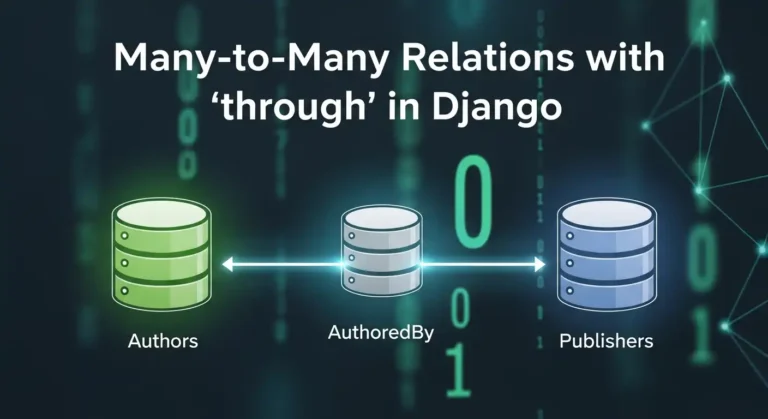
image of many to many relation in Django

Many-to-Many Relations with ‘through’ in Django

Hey there! If you’ve been working with Django for a while, you’ve probably used many-to-many relationships. They’re great, right? But have you ever felt like you needed more control over that relationship? Like, you want to store extra information about the connection between two models? That’s exactly where the through parameter comes in, and trust me, once you get the hang of it, you’ll wonder how you ever lived without it. What’s a Many-to-Many Relationship Anyway? Before we dive into the through stuff, let’s quickly recap. A many-to-many relationship is when multiple instances of one model can be related to multiple instances of another model. Think about it like this: You get the idea! The Basic Many-to-Many Setup Usually, you’d set up a many-to-many relationship like this: Django automatically creates an intermediate table behind the scenes to handle this relationship. Easy peasy! But here’s the thing – what if you want to store more information about the enrollment? Like when the student enrolled, what grade they got, or whether they’ve completed the course? Enter the ‘through’ Parameter This is where the magic happens. The through The parameter lets you create your own intermediate model with whatever extra fields you want. Here’s how it works: See what we did there? We told Django: “Hey, use this Enrollment model to manage the relationship between Student and Course.” Why Would You Want to Do This? Here are some real-world scenarios: 1. Social Media App: You have Users and Groups. The membership can have a role (admin, moderator, member) and a join date. 2. E-commerce Platform Products and Orders. The intermediate table stores quantity, price at time of purchase, and any discounts applied. 3. Project Management Employees and Projects. You want to track the role of each employee in each project and the hours they’ve worked. 4. Recipe App: Recipes and Ingredients. The intermediate table holds the quantity and measurement unit for each ingredient. How to Work with Through Models Creating Relationships You can’t use the simple add() method anymore. You need to create instances of your “through” model directly: Querying Relationships You can query in both directions: Filtering with Extra Fields Here’s where it gets really cool: Important Things to Remember 1. ForeignKey Fields are Required. Your through model MUST have foreign keys to both models in the relationship. 2. unique_together. Usually, you want to prevent duplicate relationships, so use unique_together in the Meta class. 3. No Direct add(), create(), or set(). When using a through model, you can’t use these shortcuts. You have to create instances of the through model directly. 4. Removal Still Works. You can still use remove() and clear(): Complex Example Let’s say you’re building a music streaming app: Now you can do cool stuff like: Common Problems to Avoid 1. Forgetting to Create the Through Instance. Don’t try to use add() – it won’t work! 2. Not Using unique_together. You might end up with duplicate relationships, which can cause weird bugs. 3. Making the Through Model Too Complex: Keep it focused on the relationship. If you’re adding tons of fields, maybe they belong in one of the main models instead. 4. Circular Import Issues. If you reference models as strings (like through=’Enrollment’), make sure the model is defined in the same file or properly imported. When NOT to Use Through You don’t always need a through model! Use the simple many-to-many if: Remember: premature optimization is the root of all evil. Don’t overcomplicate things if you don’t need to! Wrapping Up The through parameter in Django’s many-to-many relationships is super powerful. It gives you complete control over intermediate tables and lets you model complex real-world relationships accurately. Start simple, and add complexity only when you need it. Your future self (and your teammates) will thank you for keeping things as straightforward as possible while still meeting your requirements. Now go ahead and build something awesome! And remember, every complex relationship in your database is just a bunch of simple relationships working together.

Many-to-Many Relations with ‘through’ in Django Read More »

Real questions from my recent Python Developer interview

Interview Questions I Faced for a Python Developer

Hi guys, recently I gave an interview at a startup company. I can’t reveal their name, but I am posting the questions they asked me. It was a Python Developer interview, but they also asked questions from Django, MySQL, and JavaScript. 1. What is a Django Signal? A Django signal is a messaging system that allows certain parts of your application to send notifications (signals) when an action occurs, and other parts of the app can listen and react to those events automatically. In Other words:Signals let you run some code whenever something happens in Django (like after a user is saved, deleted, or logged in). 2. How does map() work in JavaScript? map() is an array method that loops through each element, applies a function, and returns a new array without modifying the original. Example: 3. What is Django ORM? Django ORM is Object Relational Mapper that lets you interact with the database using Python instead of SQL. Example: 4. What is a Trigger in SQL? A trigger is an automatic block of SQL code that runs when you insert, update, or delete data in a table. Used for logs, validation, and audits. 5. Example of One-to-Many relationship in Django ORM 6. Difference between REST API and SOAP API SOAP is a strict, XML-based protocol with built-in security REST is a lightweight, flexible API style using JSON. REST SOAP Flexible Strict JSON/XML XML Only Lightweight Heavy No WSDL Uses WSDL Quick Slower Keep it short in interviews. 7. How do you authenticate a REST API? You can authenticate REST APIs using: Mention JWT, it’s the most popular. 8. DDL – Data Definition Language DDL (Data Definition Language) is a type of SQL command used to define, create, modify, and delete database structures such as tables, indexes, schemas, and views. Commands: Deals with tables, columns, and schemas. 9. DML – Data Manipulation Language DML (Data Manipulation Language) is a set of SQL commands used to insert, update, delete, and retrieve data from a database. Commands:  Changes data, not structure. 10. How you write a custom SQL query in django Django provides a connection.cursor() functionality, and by using this cursor, we can write and execute custom SQL queries directly. For example:

Interview Questions I Faced for a Python Developer Read More »

How Google Wants to Bring AI to Every High School Student

How Google Wants to Bring AI to Every High School Student

Google CEO Sundar Pichai recently appeared at the White House as part of the AI Education Taskforce. He discussed Google’s commitment to helping students and teachers use AI to their advantage. Pichai started by thanking the First Lady and other government officials for starting the Presidential AI Challenge, which encourages kids to think of new ways to use technology. He mentioned something personal: having access to computers as a child affected his life and eventually brought him to Google. He thinks AI is the best way to help everyone study better now. Making Learning Accessible for All Pichai explained that Google’s long-standing goal has always been to make information accessible to everyone. Moreover, he emphasized that AI is now the key to achieving this vision. As a result, he imagines a future where every student, regardless of where they live or what their background may be — can learn anything in the way that works best for them. That’s why Google has built technology like: This means students and teachers can use AI tools like Guided Learning to support assignments, research, and participation in the AI Challenge. Major Investments in AI Education Google recently announced a $1 billion commitment over the next three years to support education and job training in the U.S. As part of that: Google has also created a central online hub where teachers and parents can access AI training and resources. Building the Future Together Pichai wrapped up by emphasizing a shared goal: helping young people solve big problems, spark new ideas, and build a better future. He thanked the First Lady, the Administration, and partners across education and government for working together to make this vision possible.

How Google Wants to Bring AI to Every High School Student Read More »

Jio Partners with Google Get Free Gemini 2.5 Pro Unlimited Access

Jio Users Can Now Get Free Gemini 2.5 Pro Unlimited Access

Google has announced a major strategic partnership with Reliance Intelligence to expand access to AI across India. As a result, Jio Unlimited 5G users will receive Google’s AI Pro plan, including Gemini 2.5 Pro at no extra cost for 18 months. Initially, the rollout will reach users aged 18 to 25, and later, it will extend to all eligible Jio customers. Moreover, this partnership gives millions of Jio subscribers access to some of Google’s most advanced AI tools. First, users will gain full access to Gemini 2.5 Pro, Google’s most capable AI model. Next, they will enjoy enhanced image and video generation through Nano Banana and Veo 3.1. In addition, students and researchers will benefit from NotebookLM’s powerful study and analysis features. Furthermore, eligible users will receive 2 TB of cloud storage across Google Photos, Gmail, Drive, and even WhatsApp backups on Android. Altogether, these benefits amount to an estimated value of ₹35,100. To activate the offer, Jio users simply need to visit the MyJio app. The feature will appear automatically once the rollout reaches their account. Overall, this partnership marks a significant step forward for AI adoption in India. Google and Reliance aim to empower millions of people with top-tier AI tools that enhance learning, creativity, and productivity. What Eligible Jio Users Will Get With this partnership, millions of Jio subscribers will gain premium access to Google’s most advanced AI technologies. The offering includes: Gemini 2.5 Pro Access Full access inside the Gemini app to Google’s most capable, large-scale AI model, enabling smarter chat, coding help, learning assistance, content creation, and more. Enhanced Image & Video Generation Users will enjoy expanded limits to generate high-quality images and videos via: NotebookLM Premium Ideal for students, researchers, and professionals. NotebookLM helps you understand documents, generate insights, and simplify learning using your own study material. 2 TB Google Cloud Storage Across: This storage upgrade alone brings tremendous value for users needing space for media and documents. Total Value Worth ₹35,100 All these benefits combined represent an estimated value of ₹35,100, now available free for eligible Jio users. How to Activate the Offer Eligible customers can activate their 18-month Google AI Pro plan simply by using the MyJio app. The feature will appear automatically for users once the rollout reaches their account. A Big Step for India’s AI Adoption This partnership marks a significant milestone in bringing advanced AI capabilities to everyday consumers across India. By offering premium AI access at no additional cost, Google and Reliance aim to empower millions of users—from students and creators to professionals and tech enthusiasts. With AI becoming an essential digital skill, this move is expected to accelerate India’s adoption of next-generation tools for learning, creativity, productivity, and communication. Google states that it is “excited to expand access to our most powerful AI models to more people across India” and looks forward to seeing how users leverage these tools to improve everyday life.

Jio Users Can Now Get Free Gemini 2.5 Pro Unlimited Access Read More »

How Microsoft Copilot Helps First West Credit Union Deliver Smarter, More Human Banking

How Microsoft Copilot Helps First West Credit Union Deliver Smarter, More Human Banking

First West Credit Union, one of Canada’s largest with over 280,000 members, has rolled out Microsoft 365 Copilot to all 1,300 employees, becoming the first major Canadian financial institution. Branch managers like Adi Bhatia now prepare for member appointments in seconds instead of digging through documents and procedures. Copilot lets advisors instantly find the right policies, lending steps, or background information, allowing them to focus on meaningful conversations instead of administrative work. The transformation began with small pilots in 2024, where early adopters tested Copilot on real workflows like retail lending and unstructured data searches. These experiments quickly showed how AI could turn complex documents into clear answers, sparking excitement across the organization. Leaders like CEO Launi Skinner and COO Paul Brodeur say the biggest impact is cultural: Copilot reduces administrative load and boosts confidence, enabling advisors to deliver faster responses, clearer financial guidance, and a more personal member experience. For high-volume processes like mortgage renewals, Copilot now provides step-by-step instructions instantly, saving employees time and reducing their dependency on colleagues. Overall, Copilot is helping First West elevate human connection — using AI to streamline the work behind the scenes so employees can spend more time supporting members.

How Microsoft Copilot Helps First West Credit Union Deliver Smarter, More Human Banking Read More »

Top 5 AI Web Browsers Available in 2025

Top 5 AI Web Browsers Available in 2025

Hi guys! Today I’ll tell you about the top 5 AI web browsers available in the market and which one is the best.The way we browse the internet is transforming dramatically. AI-powered browsers are no longer just tools for viewing web pages they’ve become intelligent assistants that understand your intent, automate tasks, and help you get things done efficiently. Here are the top 5 AI web browsers revolutionizing how we interact with the web in 2025. 1. Perplexity Comet: Browse at the Speed of Thought Best For: Research, agentic AI tasks, and power users Perplexity has leveraged its reputation as one of the best AI platforms to create Comet, a browser that truly lives up to its tagline: “browse at the speed of your thoughts.” Built on the Chromium platform, Comet takes an AI-first approach to web browsing. Key Features: The Catch: Deep personalization requires extensive data collection, which may not be ideal for privacy-conscious users. The interface resembles Chrome with a dark grey theme, which some users find uninspiring. Availability: Free (as of October 2025) 2. ChatGPT Atlas: OpenAI’s Browser Enters the Arena Best For: ChatGPT users and those seeking seamless AI integration OpenAI made its move into the browser wars with ChatGPT Atlas, launching in October 2025 as a significant step in challenging Google’s dominance in how people find information online. Key Features: The Reality: Early testing suggests Atlas works well for simple tasks but struggles with more complex automation that users might want to offload to AI. Availability: macOS (launched October 2025), Windows, iOS, and Android coming soon. Free for basic features; agent mode requires paid subscription. 3. Opera Neon: The Premium Agentic Experience Best For: AI power users willing to pay for advanced capabilities Opera Neon represents a complete reimagining of what a browser can be in the age of intelligent agents. This subscription-based browser is designed for professionals who use AI extensively in their daily workflows. Key Features: The Investment: Opera Neon is a premium product requiring a $19.99 monthly subscription, positioning it squarely as a tool for power users. Availability: Gradual rollout via waitlist (started September 2025) 4. Arc (web browser) Best For: Productivity enthusiasts and those who love Arc browser From the creators of the popular Arc browser comes Dia, an AI-centric browser currently in invite-only beta. Dia maintains the innovative design philosophy Arc was known for while pushing deeper into agentic AI territory. Key Features: The Limitation: Currently only available for Mac and Windows users running macOS 14 Sonoma or higher with M1 chips or later. Arc members get immediate access; others must join the waitlist. Arc is the Chrome replacement I’ve been waiting for. Availability: Mac os and window os 5. Microsoft Edge Copilot Mode: The Established Player’s Answer Best For: Users already in Microsoft’s ecosystem Microsoft didn’t sit idly while startups launched AI browsers. The company transformed its Edge browser with Copilot Mode, creating what CEO Mustafa Suleyman calls “an AI browser that is your dynamic, intelligent companion.” Key Features: The Advantage: For users already invested in Microsoft’s ecosystem, Copilot Mode offers powerful AI features without switching browsers. Availability: Launched July 2025, with enhanced features rolled out in October 2025 The AI Browser Revolution: What It Means for You AI browsers represent a fundamental shift in how we interact with the internet. Instead of passive tools that simply display web pages, they’re becoming active partners that: The Trade-offs While these capabilities sound impressive, there are important considerations: Which Browser Should You Choose? Perplexity Comet if: You need powerful research capabilities and want access to multiple AI models for free. ChatGPT Atlas if: You’re already a ChatGPT user and want seamless integration with a familiar AI assistant. Opera Neon if: You’re an AI power user willing to invest $19.99/month for premium agentic capabilities and privacy-focused local processing. Choose Arc browser if: You’re a Mac or Windows user who values innovative design and loves the Arc browser experience. Microsoft Edge Copilot Mode if: You’re already in Microsoft’s ecosystem and prefer enhancing your existing browser over switching. The Future of Browsing We’re witnessing the early days of what Opera calls “Web 4.0” an agentic web where browsers don’t just show you information but actively help you accomplish goals. While the technology is still maturing, the trajectory is clear: the browser of tomorrow will be less about viewing pages and more about getting things done. The question isn’t whether AI browsers will become mainstream, but how quickly users will adapt to this new paradigm. For now, early adopters have an exciting array of options to explore, each offering a unique vision of what intelligent browsing can become. As these platforms continue evolving, we’ll likely see traditional browsers like Chrome and Safari integrate more AI features, while dedicated AI browsers refine their capabilities and iron out early-stage limitations. The browser wars of 2025 aren’t just about market share; they’re about defining how humanity interacts with the internet for the next decade. Comment below if you want to know more.

Top 5 AI Web Browsers Available in 2025 Read More »

Building Real-World APIs with FastAPI

Building Real-World APIs with FastAPI

When I first started working with FastAPI, I was blown away by how quickly I could get a simple API up and running. But as my projects grew from proof-of-concepts to production systems serving thousands of requests per second, I learned that writing scalable FastAPI applications requires more than just decorating functions with @app.get(). Today, I want to share the patterns and practices I’ve developed over the past few years building APIs that actually scale in the real world. Why FastAPI? Before diving deeper, let me quickly justify why FastAPI has become my go-to framework. It’s not just hype—FastAPI genuinely delivers on its promises: But speed and features mean nothing if your codebase becomes unmaintainable at scale. The Layered Architecture Pattern The first mistake I made was putting everything in a single main.py file. It worked great for tutorials, but became a nightmare in production. Here’s the architecture I now use for every project: This structure separates concerns clearly: API endpoints handle HTTP, services contain business logic, and models represent data. It’s not over-engineering—it’s sustainable engineering. Dependency Injection: Your Best Friend FastAPI’s dependency injection system is powerful, but it took me a while to appreciate it fully. Here’s how I use it for database sessions: But dependencies aren’t just for databases. I use them for: The beauty is that dependencies are testable and composable. You can mock them easily in tests without touching your endpoint code. Configuration Management Done Right Hard-coded configuration is a recipe for disaster. I use Pydantic’s BaseSettings for environment-based config: This pattern gives you: Async All the Way (But Wisely) FastAPI supports async endpoints, but mixing sync and async code incorrectly can kill performance. Here’s what I learned: Use async when: Stick with sync when: Don’t make everything async just because you can. Profile and measure. Error Handling and Custom Exceptions Early on, I let exceptions bubble up and relied on default error messages. Bad idea. Now I use custom exception handlers: This gives you consistent error responses across your API and makes debugging much easier. Request Validation with Pydantic Pydantic schemas are more than just data containers—they’re your first line of defense against bad data: The validation happens automatically before your endpoint code runs. Invalid requests never reach your business logic. Background Tasks for Better Response Times Don’t make users wait for tasks that don’t need to be completed before responding: For heavier workloads, integrate with Celery or RQ, but background tasks are perfect for lightweight async operations. Testing Strategies That Work I use TestClient for integration tests and dependency overrides for mocking: The ability to override dependencies makes testing incredibly clean—no monkey patching required. Database Session Management One of the trickiest aspects is managing database sessions correctly. Here’s my pattern: Never create global database sessions. Always use dependency injection and let FastAPI handle the lifecycle. Monitoring and Observability You can’t improve what you don’t measure. I add middleware for request logging and timing: For production, integrate with proper monitoring tools like Prometheus, DataDog, or New Relic. Rate Limiting for Protection Protect your API from abuse with rate limiting. I use slowapi: Caching for Performance For expensive operations or frequently accessed data, implement caching: For distributed caching, Redis is your friend. Use libraries like aioredis for async support. Final Thoughts Building production-grade APIs with FastAPI isn’t about following every pattern blindly—it’s about understanding which patterns solve real problems in your specific context. Start simple, profile your application, identify bottlenecks, and apply these patterns where they make sense. Over-engineering early is just as bad as under-engineering. The patterns I’ve shared here have saved me countless hours of debugging and refactoring. They’ve helped me build APIs that handle millions of requests per day with confidence. FastAPI gives you the tools, but it’s up to you to use them wisely. Happy coding!

Building Real-World APIs with FastAPI Read More »

Scroll to Top