Ordinary Least Squares

Most likely, you have previously encountered a trendline on a scatter plot. Through a cloud of dots, that straight line? It was unable to guess its destination. It was calculated. The basis of almost all basic regression models in statistics, economics, and data science is a computation known as Ordinary Least Squares (OLS). What is OLS, really? Imagine attempting to forecast website traffic using the number of social media shares a post receives. You gather fifty data points. Plotting them reveals a distinct increasing tendency, even though they don’t form a perfect line. The straight line that best matches those locations is found using OLS. “Best” refers to reducing the overall squared distance between each actual data point and the predicted line. That line looks like this: Where: Why “Least Squares”? Because OLS doesn’t just add up the errors (predicted vs. actual). It squares them first. Why? The result? One mathematically unique line that minimizes the total squared error. What OLS gives you When OLS works beautifully (and when it doesn’t) Works well when: Fails badly when: A real-world example Let’s say you run a small online store. You regress daily sales (( y )) on daily ad spend (( x )). OLS tells you: “For every $1 you spend on ads, sales increase by $4.20.” That’s gold. Now you know whether ads are profitable. The bottom line OLS is not fancy. It’s not deep learning. It won’t win a Kaggle competition on messy image data. But for understanding relationships, making simple predictions, and explaining results to a boss or client, OLS is still one of the most powerful tools you can learn. It fits on a single line of Python (statsmodels or scikit-learn), R (lm()), or even Excel.

Ordinary Least Squares Read More »

Simple linear regression

Imagine you’re a restaurant owner. You notice that on warmer days, more people buy ice cream. If you could quantify that relationship, you could predict sales based on tomorrow’s weather forecast. That’s exactly what simple linear regression does. It’s one of the most fundamental tools in statistics and machine learning. And despite its name, it’s genuinely simple. What Is Simple Linear Regression? At its core, simple linear regression models the relationship between two continuous variables: The method finds the best straight line that describes how Y changes when X changes. Think back to high school algebra: y = mx + b. Linear regression is the same idea, just with fancier terminology and statistical rigor. The Formula (Don’t Worry, It’s Painless) The population model looks like this: Here’s what it means in plain English: Symbol Meaning Plain Translation Y Dependent variable What you’re predicting X Independent variable What you’re using to predict β₀ Intercept Value of Y when X equals zero β₁ Slope How much Y changes when X increases by 1 unit ε Error term Stuff your model can’t explain The fitted model (what you actually use) is simply: Where Ŷ (pronounced “Y-hat”) is your prediction. A Concrete Example Let’s say you want to predict exam scores based on hours studied. Hours Studied (X) Actual Score (Y) 1 55 2 65 3 70 4 80 After running the regression, you get this line: How to interpret this: So if a student studies 5 hours: 45 + 8.5(5) = 87.5 predicted score. Pretty useful, right? How Does It Find the “Best” Line? The method used is called Ordinary Least Squares (OLS) – a name that sounds complicated but isn’t. OLS finds the line that minimizes the sum of squared residuals. What’s a residual? The difference between your actual Y value and your predicted Ŷ value. Imagine drawing a line through your data points. Some points are above the line, some below. The residuals are those vertical distances. OLS squares them all (so negatives don’t cancel positives) and adds them up. The line with the smallest total wins. That’s it. That’s the magic. The Four Assumptions You Should Know Linear regression works well when certain conditions are met. Think of these as the rules of the road: 1. Linearity The relationship between X and Y must be linear. If your data looks like a U-shape or an S-curve, a straight line won’t cut it. 2. Independence Each observation should be independent of the others. This fails with time series data (today’s stock price depends on yesterday’s) or clustered data (students in the same classroom). 3. Homoscedasticity (say that three times fast) The spread of residuals should be roughly constant across all X values. If predictions are wildly inaccurate for high X values but spot-on for low X values, you have a problem. 4. Normality (mostly for inference) The errors should be roughly normally distributed. This matters primarily if you’re calculating confidence intervals or p-values. Quick check: Plot your residuals. If they look random with no obvious patterns, you’re probably fine. How Good Is Your Model? You’ve run the regression. Now what? Here are the key metrics to evaluate your model: R-squared (R²) This tells you what proportion of the variance in Y is explained by X. Ranges from 0 to 1. Higher is better, but beware: adding any variable increases R², even useless ones. Residual Standard Error (RSE) This is the typical size of your prediction errors, measured in the same units as Y. If RSE = 5 points and you’re predicting exam scores, your predictions are typically off by about ±5 points. P-value for the Slope This tests whether the slope is significantly different from zero. When Should You Actually Use It? Simple linear regression shines in these scenarios: Use it when you have one clear predictor, a roughly linear relationship, and you need interpretability over raw predictive power. Quick Python Implementation Want to try this yourself? Here’s a minimal example using statsmodels: The output gives you coefficients, R-squared, p-values, and diagnostic information – everything you need to interpret your model.

Simple linear regression Read More »

Coding Questions

Top 100 coding questions in Python

I have shared basic to advanced-level interview questions and answers. BASIC LEVEL (1-20) 1. Reverse a String 2. Check if a string is a palindrome 3. Find Factorial 4. Fibonacci Sequence 5. Check Prime Number 6. Find Maximum in List 7. Remove Duplicates from List 8. Count Character Frequency 9. Check Anagram 10. Find Missing Number in Array 11. Find Second Largest Number 12. Check Armstrong Number 13. Sum of Digits 14. Find GCD 15. Find LCM 16. Count Vowels in String 17. Check if String Contains Only Digits 18. Find Intersection of Two Lists 19. Find Union of Two Lists 20. Check Balanced Parentheses INTERMEDIATE LEVEL (21-60) 21. Two Sum Problem 22. Find Duplicates in Array 23. Move Zeros to End 24. Rotate Array 25. Find Majority Element 26. Binary Search 27. Merge Sorted Arrays 28. First Non-Repeating Character 29. Implement Stack using List 30. Implement Queue using List 31. Reverse Linked List 32. Detect Cycle in Linked List 33. Find Middle of Linked List 34. Implement Binary Tree 35. Tree Traversals 36. Maximum Depth of Binary Tree 37. Validate Binary Search Tree 38. Find All Permutations 39. Find All Subsets 40. Longest Substring Without Repeating Characters 41. Container With Most Water 42. 3Sum Problem 43. Merge Intervals 44. Find Peak Element 45. Search in Rotated Sorted Array 46. Word Break Problem 47. Longest Palindromic Substring 48. Implement LRU Cache 49. Find Kth Largest Element 50. Top K Frequent Elements ADVANCED LEVEL (51-80) 51. Serialize and Deserialize Binary Tree 52. Find Median from Data Stream 53. Regular Expression Matching 54. Wildcard Matching 55. Edit Distance 56. Coin Change Problem 57. Longest Increasing Subsequence 58. Maximum Subarray Sum (Kadane’s Algorithm) 59. House Robber 60. Climbing Stairs 61. Unique Paths 62. Decode Ways 63. Word Search 64. Number of Islands 65. Course Schedule (Cycle Detection) 66. Minimum Window Substring 67. Sliding Window Maximum 68. Trapping Rain Water 69. Largest Rectangle in Histogram 70. Merge K Sorted Lists 71. Sort Colors (Dutch National Flag) 72. Find First and Last Position 73. Spiral Matrix 74. Set Matrix Zeros 75. Valid Sudoku 76. N-Queens Problem 77. Sudoku Solver 78. Evaluate Reverse Polish Notation 79. Implement Trie (Prefix Tree) 80. Design Twitter ADVANCED ALGORITHMS & DATA STRUCTURES (81-100) 81. LFU Cache 82. Find Median in Two Sorted Arrays 83. Longest Consecutive Sequence 84. Alien Dictionary 85. Minimum Path Sum 86. Palindrome Partitioning 87. Reconstruct Itinerary 88. Minimum Height Trees 89. Word Ladder 90. Count of Smaller Numbers After Self 91. Maximal Rectangle 92. Burst Balloons 93. Serialize and Deserialize N-ary Tree 94. Flatten Nested List Iterator 95. Max Points on a Line 96. Word Search II 97. Candy Crush (1D) 98. Employee Free Time 99. Race Car 100. Swim in Rising Water

Top 100 coding questions in Python Read More »

What Is R Language

What is R Language?

I was wondering, every time I learned a data science course, I saw R. But today I learned about it, and I will give you a simple guide on what the R language is and why it is fast and popular in data science and machine learning. If you are stepping into the world of data science, analytics, or statistics, you have probably heard about the R language. But what exactly is R, and why is it so popular among data professionals? In simple words, R is a programming language used for data analysis, statistical computing, and data visualization. It helps you work with data, find patterns, and present insights in a clear and meaningful way. In this guide, you will learn what the R language is, its features, uses, and why you should consider learning it. R Language? R is an open-source programming language specifically designed for data analysis and statistics. Unlike general-purpose languages, R focuses on handling data efficiently and performing complex calculations with ease. You can use R to: It is widely used by data scientists, researchers, analysts, and businesses around the world. History of the R Programming Language R was developed in the early 1990s by two statisticians who wanted a free and powerful tool for data analysis. Their goal was to make statistical computing accessible to everyone. Today, R has evolved into one of the most widely used tools in data science, supported by a strong global community. Key Features of R Language 1. Open Source and Free R is completely free to use. You can download and start using it without any cost. 2. Powerful Data Analysis R provides built-in functions and libraries that make data manipulation and statistical analysis easier. 3. Excellent Data Visualization R allows you to create high-quality graphs and charts that help in understanding data better. 4. Large Package Ecosystem R has thousands of packages that extend its capabilities for different types of analysis. 5. Strong Community Support A large community of developers continuously contributes to improving R and creating new tools. Uses of the R Language R is used in multiple industries and domains. Some common use cases include: Advantages of R Language Disadvantages of R Language Simple Example in R This example shows how easily you can calculate the average of a dataset using R. R vs Python for Data Science Both R and Python are popular in data science. If your focus is data analysis, R is a great choice. Why Should You Learn R Language? Learning R can help you: Conclusion R language is a powerful Programming Language for anyone interested in data analysis and statistics. It simplifies complex calculations, helps visualize data, and allows you to gain valuable insights.

What is R Language? Read More »

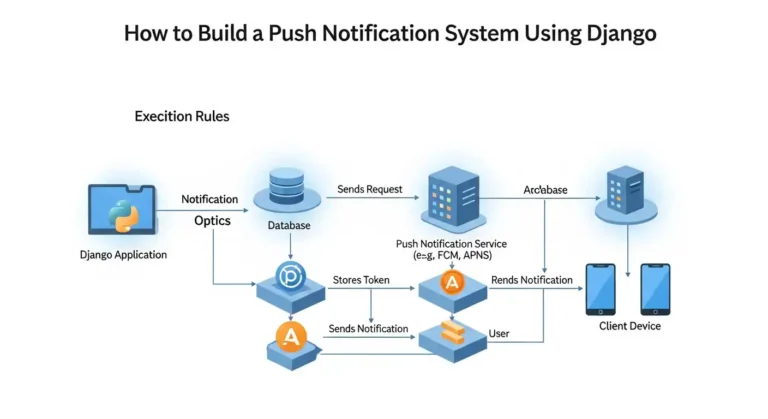
How to Build a Push Notification System Using Django

Imagine your app could send instant updates to users the moment something important happens, whether it’s a new message, an order update, or a security alert. Push notifications make this possible by delivering real-time information directly to users without requiring them to refresh the app or constantly check for updates. In modern applications, push notifications play a crucial role in improving user engagement and keeping users informed. From social media alerts to e-commerce order updates, they help create a more interactive and responsive user experience. Why Push Notifications? Push notifications help applications improve user engagement by delivering real-time updates. Some common use cases include: With Django, you can easily build a backend service that generates and sends notifications to users. Architecture Overview A typical push notification system consists of the following components: The flow looks like this: User Action → Django Backend → Save Notification → Send Push → User Device Step 1: Create a Django Project First, install Django if you haven’t already: Create a new project and app: Add the app to INSTALLED_APPS in settings.py. Step 2: Create the Notification Model Create a model to store notifications. Run migrations: This will create a database table to store notifications. Step 3: Create a Notification Service Create a utility function to generate notifications. Now you can trigger notifications anywhere in your Django project. Example: Step 4: Create an API to Fetch Notifications You may want to show notifications inside your application. Add URL: Step 5: Real-Time Notifications (Optional) For real-time notifications, you can use WebSockets with Django Channels. Install channels: Channels allow Django to push updates instantly to connected users without refreshing the page. Step 6: Sending Push Notifications to Mobile Devices If you want to send notifications to mobile apps, you can integrate with services such as: Example using Firebase: Step 7: Mark Notifications as Read You may want users to mark notifications as read. Best Practices When building a production notification system: Conclusion Building a push notification system in Django is straightforward. By creating a notification model, service layer, and API endpoints, you can manage and deliver notifications efficiently. For real-time systems, integrating Django Channels or Firebase can significantly improve user experience. Push notifications are a powerful way to keep users engaged and informed, making them a valuable addition to any modern application.

How to Build a Push Notification System Using Django Read More »

Claude Code: Your AI Pair Programmer in the Terminal

If you’ve ever wished you had a brilliant coding teammate available who knows your entire codebase inside and out, Claude Code might be exactly what you’ve been looking for. Built by Anthropic, Claude Code is an agentic coding tool that lives right in your terminal — no fancy GUI, no context-switching, just you, your code, and an AI that actually understands what you’re building. What Exactly Is Claude Code? Claude Code is more than an autocomplete engine or a fancy search bar. Think of it as a hands-on AI developer that you chat with using plain English. It reads your project files, understands the context of your codebase, and can make real changes — write functions, fix bugs, refactor legacy code, handle Git workflows, and explain complex modules — all without you leaving the terminal. Ask it: “Create an async function that fetches user data from the /api/users endpoint,” and it won’t just suggest something — it’ll write it, put it in the right file, and move on to the next task. This is powered by Anthropic’s Claude models (Opus 4.6, Sonnet 4.6, and Haiku 4.5), which means Claude Code inherits their ability to reason through multi-step tasks, handle nuanced instructions, and engage in real back-and-forth conversation. Platform Compatibility: Where Does Claude Code Run? One of the best things about Claude Code is how broadly compatible it is. It’s not locked to a single ecosystem. 1. Operating Systems Claude Code runs natively on all three major platforms: 2. Shells Supported Claude Code works with the shells developers actually use: On Windows, Git for Windows is required for native use. Claude Code uses Git Bash internally to run shell commands, so you don’t need to run PowerShell as Administrator. 3. IDEs & Editors Claude Code is not tied to any single editor. You can use it standalone in your terminal, or deeply integrated via native extensions: AI Model Compatibility Claude Code supports multiple Claude models, giving you flexibility depending on your needs and budget: Cloud Provider Compatibility Enterprise teams aren’t limited to Anthropic’s own infrastructure. Claude Code integrates with: This is a huge deal for organizations that need to keep data within specific cloud environments or already have negotiated cloud contracts. MCP (Model Context Protocol) Servers Claude Code supports MCP servers, which lets it extend its capabilities using your own tools — like connecting to GitHub’s MCP server to interact with pull requests, issues, and repositories directly. Enterprise teams can even configure a managed MCP allowlist/denylist for governance and security. Account Compatibility: Who Can Access Claude Code? Claude Code requires one of the following Anthropic account types: ⚠️ The free Claude.ai plan does not include Claude Code access. Installation Compatibility Recommended: Native Installer The preferred method is the native binary installer — it’s faster, requires no dependencies, and auto-updates in the background. Alternative: npm (Legacy) If you need npm for compatibility reasons, Node.js 18+ is required. Note that npm installation is now deprecated in favor of the native installer. Package Managers Linux Special Cases For Alpine Linux and other musl/uClibc-based distributions, you’ll need libgcc, libstdc++, and ripgrep installed via your package manager, plus set USE_BUILTIN_RIPGREP=0. What Can Claude Code Actually Do? Beyond being compatible with your setup, Claude Code handles the full development lifecycle: Writing & Generating Code: New functions, components, boilerplate, unit tests — all from natural language descriptions. Debugging: Describe the error, and Claude Code digs through relevant files to find and fix the root cause. Refactoring: Clean up legacy code, improve performance, and improve readability without breaking existing functionality. Git Workflows: Commit messages, branch management, PR summaries, all from the terminal. Codebase Explanation: Ask it to explain what a module does, trace a data flow, or summarize an unfamiliar project. Huge time-saver for onboarding. Multi-Agent Collaboration: Claude Code now supports experimental agent teams, where multiple AI agents can collaborate on complex tasks with a team lead and shared task lists. A Note on Privacy & Security Claude Code runs locally in your terminal and communicates directly with model APIs — there’s no backend server or remote code index. Before making any changes to your files or running commands, it asks for your permission. Sandbox mode (available on Linux and macOS) adds an extra layer of security by restricting what Claude Code can do without approval. Final Verdict Claude Code is one of the most compatible AI coding tools available today. Whether you’re on macOS, Linux, or Windows; using VS Code, JetBrains, or a plain terminal, running on Anthropic’s infrastructure or your own AWS Bedrock environment Claude Code meets you where you are. If you live in the command line and want an AI partner that truly understands your codebase (not just autocompletes your next line), Claude Code is worth trying. Just make sure you have a Pro, Max, Teams, Enterprise, or Console account to get started.

Claude Code: Your AI Pair Programmer in the Terminal Read More »

Where We Stand: Anthropic, the Military, and Two Lines We Won't Cross

Where We Stand: Anthropic, the Military, and Two Lines We Won’t Cross

We’ve built AI for the U.S. military, and we’re proud of it. But the Pentagon is now asking us to remove safeguards we believe protect American lives and democracy. Here’s why we said no. Published February 26, 2026 First, some context: we’re deeply committed to national defense Anthropic believes that AI is one of the most important technologies in the world right now, and that the United States and its democratic allies need to lead in developing it safely. That’s not just talk. We’ve put it into action. We were the first frontier AI company to deploy our AI on classified U.S. government networks. The first to bring it to the National Laboratories. The first to build custom AI tools for national security customers. Today, our AI Claude is used across the Department of Defense for things like intelligence analysis, military planning, cybersecurity, and more. We’ve also made real financial sacrifices for national security. We turned down hundreds of millions of dollars in revenue by cutting off access to Claude for companies connected to the Chinese Communist Party. We’ve fought back against CCP-sponsored cyberattacks on our systems. And we’ve publicly supported export controls on advanced computer chips to help keep America ahead. We are not anti-military. We are not trying to run the Pentagon. Military decisions belong to the military — not us. So what’s the dispute? The Department of Defense is now saying it will only work with AI companies that agree to allow any lawful use of their AI, which means removing two specific safeguards we have in place. Those two safeguards cover situations where we believe AI, right now, does more harm than good, even for national security. The Pentagon wants them gone. We’ve refused. And they’ve threatened serious consequences. The two things we won’t do: 1. Enable mass surveillance of American citizens2. Powerfully autonomous weapons that remove humans from life-or-death decisions Why we won’t allow mass domestic surveillance We fully support using AI for lawful intelligence work — tracking foreign threats, countering espionage, and protecting national security. That’s legitimate and important. But “mass domestic surveillance” is something different. It means using AI to automatically monitor the movements, web browsing, and personal associations of ordinary Americans, at a massive scale, without warrants, and without most people knowing it’s happening. Here’s something that might surprise you: this is currently legal in the United States. The government can buy detailed records about Americans from commercial data brokers without a warrant, because the law hasn’t kept up with modern technology. Even the intelligence community has admitted this raises serious privacy concerns, and there’s bipartisan pushback in Congress. Powerful AI makes this vastly more dangerous. Scattered pieces of data that seem harmless on their own, a location ping here, a website visit there — can now be stitched together by AI into a detailed portrait of any person’s life, automatically and at a scale that was never before possible. That’s a threat to the very democratic values we’re supposedly trying to defend. We won’t build that system. Why we won’t have powerfully autonomous weapons yet This one is more nuanced. We’re not opposed to autonomous weapons in principle. “Partially autonomous” weapons systems that assist human soldiers but keep a person in the decision loop are already being used effectively in conflicts like the war in Ukraine. We support that. “Fully autonomous” weapons are different. These are systems that would select a target and pull the trigger — or drop the bomb — entirely on their own, with no human making that final call. We believe this may eventually be necessary for national defense. But today’s AI, including ours, simply isn’t reliable enough for that responsibility. The errors AI makes can be catastrophic when the stakes involve human lives. Our professional military applies judgment, ethics, and accountability that AI systems today cannot replicate. “We will not knowingly provide a product that puts America’s warfighters and civilians at risk.” We’ve offered to work directly with the Department of Defense on research to improve AI reliability for these applications. They declined. But our position stands: fully autonomous lethal weapons need better AI than exists today, and proper oversight guardrails that don’t yet exist. We won’t deploy something we believe is unsafe. What the Pentagon threatened and why it doesn’t change our answer The Department of Defense hasn’t just asked us to reconsider. They’ve made specific threats: They said they will remove Anthropic from their systems if we keep these safeguards. They’ve also threatened to label us a “supply chain risk” — a designation that has only ever been used for foreign adversaries, never for an American company. And they’ve threatened to invoke the Defense Production Act to force us to comply. We noted the contradiction ourselves: you can’t simultaneously claim that we’re a national security risk and that our AI is essential to national security. Both can’t be true. But regardless of the threats, our answer is the same. We can’t in good conscience agree to their request. What happens now It’s the Pentagon’s right to choose which companies they work with. We respect that. Our strong preference is to keep working with the Department of Defense and the men and women who serve, just with these two safeguards in place. If they decide to remove us, we will do everything we can to make the transition smooth. We won’t leave warfighters without support. Our models will remain available under the generous terms we’ve proposed for as long as needed. We believe deeply in American security. We believe in democracy. And we believe that sometimes defending those values means saying no — even to the people asking in their name. We remain ready to serve. This post is adapted from Anthropic’s official statement to the Department of Defense, dated February 26, 2026.

Where We Stand: Anthropic, the Military, and Two Lines We Won’t Cross Read More »

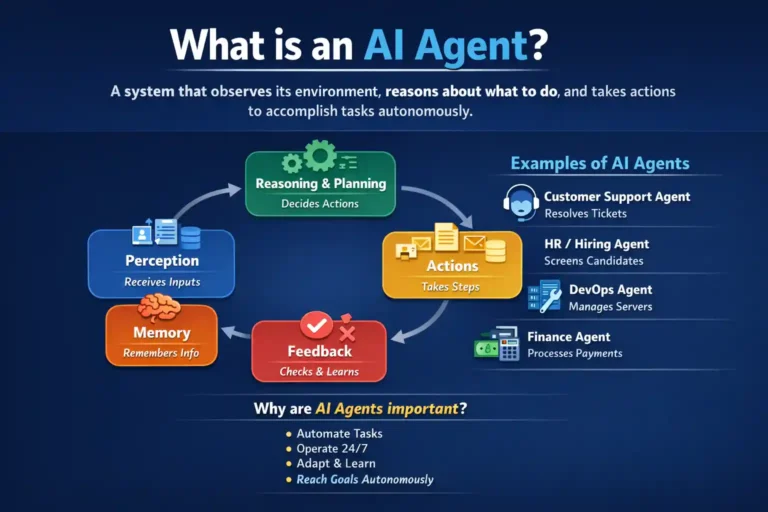
How to Build Your Own AI Agent

In this blog, I’ll provide a short and clear explanation of how you can create your own AI agent.I’ll walk you through a comprehensive Python guide for building AI agents using the Microsoft Agent Framework. Building an AI agent is a large topic, but at a high level, it can be understood in a simple and practical way. What is an AI Agent: An AI agent is a system that observes its environment, reasons about what to do, and takes actions to accomplish tasks, often repeatedly and autonomously. Step-by-Step Python Guide 1. Installation 2. Prerequisites 3. Simple Agent Example Here’s a basic joke-telling agent: 4. Agent with Tools This example demonstrates how to add custom Python functions as tools that the agent can call: 5. Using Azure OpenAI This example shows how to create an agent using Azure OpenAI: 6. Agent with Conversation History Here’s how to create an agent that remembers previous interactions: 7. Key Concepts Agent Types Available Important Features 8. Next Steps Explore these advanced topics: 9. Official Resources

How to Build Your Own AI Agent Read More »

What is hallucination?

Hallucination (General): Experiencing things that aren’t really there, seeing, hearing, or feeling something that doesn’t exist in reality. Your brain creates sensory experiences without any external source. Examples: AI Hallucination: When artificial intelligence confidently makes up information that sounds convincing but is completely false. The AI generates fake facts, citations, or details rather than admitting it doesn’t know something. Examples: Note: An AI chatbot hallucinates more than a large model, and it also depends on how you trained your models more accurately you tained less they hallucinate.

What is hallucination? Read More »

What is RAG?

So you’ve undoubtedly heard the term “RAG” thrown around in AI chats and are wondering what it means. Don’t worry, it’s not as complicated as it seems, and I’ll explain it in plain English. The Basics RAG stands for Retrieval-Augmented Generation. I know that sounds super technical. But here’s the thing: it’s actually a pretty clever solution to a problem that AI models have been dealing with for a while now. Think about it this way. You know how sometimes you’re chatting with an AI, and it just makes stuff up? Like, it sounds confident, but it’s completely wrong? That’s called hallucination, and it happens because these models are basically working from memory. They were trained on a bunch of data up until a certain point, and after that, they’re flying blind. So What Does RAG Actually Do? This is where RAG comes in. RAG allows the AI to look things up first, rather than depending just on what it learnt during training. It’s similar to the difference between answering a question from memory and quickly Googling it before responding. The process works in three main steps: First, there’s the retrieval part. When you ask a question, the system searches through a database or collection of documents to find relevant information. This could be your company’s internal docs, a knowledge base, recent articles, whatever you’ve set it up to access. Then comes the augmentation. The AI takes that retrieved information and adds it to your original question. So now it’s not just working with what you asked, it’s also got fresh, relevant context to work with. Finally, there’s the generation. The AI uses both your question and the retrieved information to generate a response. The result? Answers that are way more accurate and grounded in facts. Why Should You Care? RAG is a game-changer if you’re developing anything with AI that requires accuracy and up-to-dateness. Here’s why I believe it matters: You obtain improved accuracy because the AI uses real sources rather than just winging it. You can maintain information up to date without having to retrain your entire model each time something changes. And honestly? It simply increases the overall credibility of the situation. When an AI can point to where it received its information, that’s huge. I’ve seen this utilized for customer care chatbots that need to reference the most recent product documentation, research assistants that use scientific articles, and even internal company systems that help staff access information faster. The Real-World Picture Now, I am not going to sit here and say RAG is perfect. Setting it up requires some effort; you must arrange your papers, develop embeddings (which are essentially ways to make text searchable), and manage your database. Yes, it adds some latency because the system needs to search before responding. But what about my experience? The trade-off is usually worthwhile. Especially if accuracy is important in your use case. Wrapping Up Finally, RAG’s primary goal is to improve AI’s reliability and utility. Instead of having a model that is stuck in the past and prone to making things up, you get one that can relate to current, correct data. It’s not magic, but it comes close. And if you’re working on something that requires AI to offer correct, up-to-date responses, it’s certainly worth investigating. Have you ever used RAG in any of your projects? I would love to hear about it. Leave a remark below and let’s talk about it.

What is RAG? Read More »

Scroll to Top