AI

Ordinary Least Squares

Most likely, you have previously encountered a trendline on a scatter plot. Through a cloud of dots, that straight line? It was unable to guess its destination. It was calculated. The basis of almost all basic regression models in statistics, economics, and data science is a computation known as Ordinary Least Squares (OLS). What is OLS, really? Imagine attempting to forecast website traffic using the number of social media shares a post receives. You gather fifty data points. Plotting them reveals a distinct increasing tendency, even though they don’t form a perfect line. The straight line that best matches those locations is found using OLS. “Best” refers to reducing the overall squared distance between each actual data point and the predicted line. That line looks like this: Where: Why “Least Squares”? Because OLS doesn’t just add up the errors (predicted vs. actual). It squares them first. Why? The result? One mathematically unique line that minimizes the total squared error. What OLS gives you When OLS works beautifully (and when it doesn’t) Works well when: Fails badly when: A real-world example Let’s say you run a small online store. You regress daily sales (( y )) on daily ad spend (( x )). OLS tells you: “For every $1 you spend on ads, sales increase by $4.20.” That’s gold. Now you know whether ads are profitable. The bottom line OLS is not fancy. It’s not deep learning. It won’t win a Kaggle competition on messy image data. But for understanding relationships, making simple predictions, and explaining results to a boss or client, OLS is still one of the most powerful tools you can learn. It fits on a single line of Python (statsmodels or scikit-learn), R (lm()), or even Excel.

Ordinary Least Squares Read More »

Simple linear regression

Imagine you’re a restaurant owner. You notice that on warmer days, more people buy ice cream. If you could quantify that relationship, you could predict sales based on tomorrow’s weather forecast. That’s exactly what simple linear regression does. It’s one of the most fundamental tools in statistics and machine learning. And despite its name, it’s genuinely simple. What Is Simple Linear Regression? At its core, simple linear regression models the relationship between two continuous variables: The method finds the best straight line that describes how Y changes when X changes. Think back to high school algebra: y = mx + b. Linear regression is the same idea, just with fancier terminology and statistical rigor. The Formula (Don’t Worry, It’s Painless) The population model looks like this: Here’s what it means in plain English: Symbol Meaning Plain Translation Y Dependent variable What you’re predicting X Independent variable What you’re using to predict β₀ Intercept Value of Y when X equals zero β₁ Slope How much Y changes when X increases by 1 unit ε Error term Stuff your model can’t explain The fitted model (what you actually use) is simply: Where Ŷ (pronounced “Y-hat”) is your prediction. A Concrete Example Let’s say you want to predict exam scores based on hours studied. Hours Studied (X) Actual Score (Y) 1 55 2 65 3 70 4 80 After running the regression, you get this line: How to interpret this: So if a student studies 5 hours: 45 + 8.5(5) = 87.5 predicted score. Pretty useful, right? How Does It Find the “Best” Line? The method used is called Ordinary Least Squares (OLS) – a name that sounds complicated but isn’t. OLS finds the line that minimizes the sum of squared residuals. What’s a residual? The difference between your actual Y value and your predicted Ŷ value. Imagine drawing a line through your data points. Some points are above the line, some below. The residuals are those vertical distances. OLS squares them all (so negatives don’t cancel positives) and adds them up. The line with the smallest total wins. That’s it. That’s the magic. The Four Assumptions You Should Know Linear regression works well when certain conditions are met. Think of these as the rules of the road: 1. Linearity The relationship between X and Y must be linear. If your data looks like a U-shape or an S-curve, a straight line won’t cut it. 2. Independence Each observation should be independent of the others. This fails with time series data (today’s stock price depends on yesterday’s) or clustered data (students in the same classroom). 3. Homoscedasticity (say that three times fast) The spread of residuals should be roughly constant across all X values. If predictions are wildly inaccurate for high X values but spot-on for low X values, you have a problem. 4. Normality (mostly for inference) The errors should be roughly normally distributed. This matters primarily if you’re calculating confidence intervals or p-values. Quick check: Plot your residuals. If they look random with no obvious patterns, you’re probably fine. How Good Is Your Model? You’ve run the regression. Now what? Here are the key metrics to evaluate your model: R-squared (R²) This tells you what proportion of the variance in Y is explained by X. Ranges from 0 to 1. Higher is better, but beware: adding any variable increases R², even useless ones. Residual Standard Error (RSE) This is the typical size of your prediction errors, measured in the same units as Y. If RSE = 5 points and you’re predicting exam scores, your predictions are typically off by about ±5 points. P-value for the Slope This tests whether the slope is significantly different from zero. When Should You Actually Use It? Simple linear regression shines in these scenarios: Use it when you have one clear predictor, a roughly linear relationship, and you need interpretability over raw predictive power. Quick Python Implementation Want to try this yourself? Here’s a minimal example using statsmodels: The output gives you coefficients, R-squared, p-values, and diagnostic information – everything you need to interpret your model.

Simple linear regression Read More »

Claude Code: Your AI Pair Programmer in the Terminal

If you’ve ever wished you had a brilliant coding teammate available who knows your entire codebase inside and out, Claude Code might be exactly what you’ve been looking for. Built by Anthropic, Claude Code is an agentic coding tool that lives right in your terminal — no fancy GUI, no context-switching, just you, your code, and an AI that actually understands what you’re building. What Exactly Is Claude Code? Claude Code is more than an autocomplete engine or a fancy search bar. Think of it as a hands-on AI developer that you chat with using plain English. It reads your project files, understands the context of your codebase, and can make real changes — write functions, fix bugs, refactor legacy code, handle Git workflows, and explain complex modules — all without you leaving the terminal. Ask it: “Create an async function that fetches user data from the /api/users endpoint,” and it won’t just suggest something — it’ll write it, put it in the right file, and move on to the next task. This is powered by Anthropic’s Claude models (Opus 4.6, Sonnet 4.6, and Haiku 4.5), which means Claude Code inherits their ability to reason through multi-step tasks, handle nuanced instructions, and engage in real back-and-forth conversation. Platform Compatibility: Where Does Claude Code Run? One of the best things about Claude Code is how broadly compatible it is. It’s not locked to a single ecosystem. 1. Operating Systems Claude Code runs natively on all three major platforms: 2. Shells Supported Claude Code works with the shells developers actually use: On Windows, Git for Windows is required for native use. Claude Code uses Git Bash internally to run shell commands, so you don’t need to run PowerShell as Administrator. 3. IDEs & Editors Claude Code is not tied to any single editor. You can use it standalone in your terminal, or deeply integrated via native extensions: AI Model Compatibility Claude Code supports multiple Claude models, giving you flexibility depending on your needs and budget: Cloud Provider Compatibility Enterprise teams aren’t limited to Anthropic’s own infrastructure. Claude Code integrates with: This is a huge deal for organizations that need to keep data within specific cloud environments or already have negotiated cloud contracts. MCP (Model Context Protocol) Servers Claude Code supports MCP servers, which lets it extend its capabilities using your own tools — like connecting to GitHub’s MCP server to interact with pull requests, issues, and repositories directly. Enterprise teams can even configure a managed MCP allowlist/denylist for governance and security. Account Compatibility: Who Can Access Claude Code? Claude Code requires one of the following Anthropic account types: ⚠️ The free Claude.ai plan does not include Claude Code access. Installation Compatibility Recommended: Native Installer The preferred method is the native binary installer — it’s faster, requires no dependencies, and auto-updates in the background. Alternative: npm (Legacy) If you need npm for compatibility reasons, Node.js 18+ is required. Note that npm installation is now deprecated in favor of the native installer. Package Managers Linux Special Cases For Alpine Linux and other musl/uClibc-based distributions, you’ll need libgcc, libstdc++, and ripgrep installed via your package manager, plus set USE_BUILTIN_RIPGREP=0. What Can Claude Code Actually Do? Beyond being compatible with your setup, Claude Code handles the full development lifecycle: Writing & Generating Code: New functions, components, boilerplate, unit tests — all from natural language descriptions. Debugging: Describe the error, and Claude Code digs through relevant files to find and fix the root cause. Refactoring: Clean up legacy code, improve performance, and improve readability without breaking existing functionality. Git Workflows: Commit messages, branch management, PR summaries, all from the terminal. Codebase Explanation: Ask it to explain what a module does, trace a data flow, or summarize an unfamiliar project. Huge time-saver for onboarding. Multi-Agent Collaboration: Claude Code now supports experimental agent teams, where multiple AI agents can collaborate on complex tasks with a team lead and shared task lists. A Note on Privacy & Security Claude Code runs locally in your terminal and communicates directly with model APIs — there’s no backend server or remote code index. Before making any changes to your files or running commands, it asks for your permission. Sandbox mode (available on Linux and macOS) adds an extra layer of security by restricting what Claude Code can do without approval. Final Verdict Claude Code is one of the most compatible AI coding tools available today. Whether you’re on macOS, Linux, or Windows; using VS Code, JetBrains, or a plain terminal, running on Anthropic’s infrastructure or your own AWS Bedrock environment Claude Code meets you where you are. If you live in the command line and want an AI partner that truly understands your codebase (not just autocompletes your next line), Claude Code is worth trying. Just make sure you have a Pro, Max, Teams, Enterprise, or Console account to get started.

Claude Code: Your AI Pair Programmer in the Terminal Read More »

What is hallucination?

Hallucination (General): Experiencing things that aren’t really there, seeing, hearing, or feeling something that doesn’t exist in reality. Your brain creates sensory experiences without any external source. Examples: AI Hallucination: When artificial intelligence confidently makes up information that sounds convincing but is completely false. The AI generates fake facts, citations, or details rather than admitting it doesn’t know something. Examples: Note: An AI chatbot hallucinates more than a large model, and it also depends on how you trained your models more accurately you tained less they hallucinate.

What is hallucination? Read More »

What is RAG?

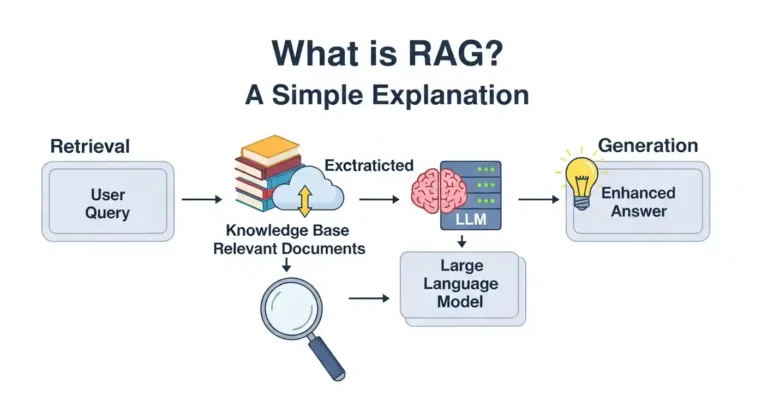
So you’ve undoubtedly heard the term “RAG” thrown around in AI chats and are wondering what it means. Don’t worry, it’s not as complicated as it seems, and I’ll explain it in plain English. The Basics RAG stands for Retrieval-Augmented Generation. I know that sounds super technical. But here’s the thing: it’s actually a pretty clever solution to a problem that AI models have been dealing with for a while now. Think about it this way. You know how sometimes you’re chatting with an AI, and it just makes stuff up? Like, it sounds confident, but it’s completely wrong? That’s called hallucination, and it happens because these models are basically working from memory. They were trained on a bunch of data up until a certain point, and after that, they’re flying blind. So What Does RAG Actually Do? This is where RAG comes in. RAG allows the AI to look things up first, rather than depending just on what it learnt during training. It’s similar to the difference between answering a question from memory and quickly Googling it before responding. The process works in three main steps: First, there’s the retrieval part. When you ask a question, the system searches through a database or collection of documents to find relevant information. This could be your company’s internal docs, a knowledge base, recent articles, whatever you’ve set it up to access. Then comes the augmentation. The AI takes that retrieved information and adds it to your original question. So now it’s not just working with what you asked, it’s also got fresh, relevant context to work with. Finally, there’s the generation. The AI uses both your question and the retrieved information to generate a response. The result? Answers that are way more accurate and grounded in facts. Why Should You Care? RAG is a game-changer if you’re developing anything with AI that requires accuracy and up-to-dateness. Here’s why I believe it matters: You obtain improved accuracy because the AI uses real sources rather than just winging it. You can maintain information up to date without having to retrain your entire model each time something changes. And honestly? It simply increases the overall credibility of the situation. When an AI can point to where it received its information, that’s huge. I’ve seen this utilized for customer care chatbots that need to reference the most recent product documentation, research assistants that use scientific articles, and even internal company systems that help staff access information faster. The Real-World Picture Now, I am not going to sit here and say RAG is perfect. Setting it up requires some effort; you must arrange your papers, develop embeddings (which are essentially ways to make text searchable), and manage your database. Yes, it adds some latency because the system needs to search before responding. But what about my experience? The trade-off is usually worthwhile. Especially if accuracy is important in your use case. Wrapping Up Finally, RAG’s primary goal is to improve AI’s reliability and utility. Instead of having a model that is stuck in the past and prone to making things up, you get one that can relate to current, correct data. It’s not magic, but it comes close. And if you’re working on something that requires AI to offer correct, up-to-date responses, it’s certainly worth investigating. Have you ever used RAG in any of your projects? I would love to hear about it. Leave a remark below and let’s talk about it.

What is RAG? Read More »

demo project netflix

Can Google Antigravity Replace a Junior Developer?

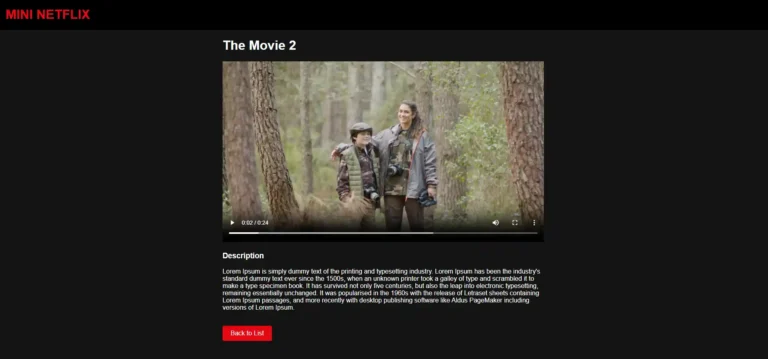
I recently built a Netflix clone without writing most of the code myself. Before you close this tab thinking I’m advocating for replacing human developers, hear me out. This experience with Google Antigravity taught me something nuanced about AI development tools and the future of junior developers. My Experiment: Building Without Coding Using Google Antigravity, I created a functional Netflix clone complete with a Django backend and a Simple frontend. I simply prompted Antigravity to add apps in Django, generate the frontend components, handle the backend logic, and tie everything together. The result? A working application that would have taken me an hour to build manually was ready in just 5 minutes. So, Can Google Antigravity Replace Junior Developers? The short answer: No, but it’s complicated. Here’s what I learned from this experiment: What Google Antigravity Excels At First, you need to grant permission for him to control the Chrome browser and the terminal. Even if you provide a token, he will be able to push code to the GitHub repository by himself. Speed and boilerplate generation. Antigravity churned out repetitive code, set up project structures, and handled standard CRUD operations faster than any human could. It’s like having a junior developer who never gets tired of writing the same patterns. Pattern recognition. Need a login system? Authentication middleware? Antigravity has seen thousands of implementations and can generate one that follows best practices instantly. Syntax and framework knowledge. The tool knew Django conventions, React patterns, and CSS frameworks without needing to Google documentation every five minutes. What Google Antigravity Struggles With When dealing with complex logic involving multiple apps and API integrations, he has to dry-run the process multiple times to fix issues. Sometimes, this takes too much time for a solution that a human could implement quickly. Debugging complex issues. When things broke in unexpected ways, the AI often suggested generic fixes. Real problem-solving requires human intuition and understanding of how different parts of the system interact. Architecture decisions. Should this be a microservice? How should we structure the database for future scaling? These strategic decisions still need human judgment. Context and trade-offs. The AI doesn’t know your team’s coding standards, your company’s technical debt, or why certain “bad” solutions might actually be the right choice given real-world constraints. The Real Question: What Does This Mean for Junior Developers? Rather than asking “will AI replace junior developers,” we should ask “how will junior developer roles evolve?” Junior Developers Who Will Struggle If your value proposition is purely “I can write boilerplate code and implement straightforward features,” then yes, AI is coming for that work. Typing speed and memorizing syntax were never sustainable differentiators. Junior Developers Who Will Thrive The junior developers who will succeed are those who: My Take: AI as a Force Multiplier After building my Netflix clone, I don’t see AI as a replacement for junior developers. I see it as a tool that raises the bar for what “junior” means. In the past, a junior developer spent months learning syntax, framework basics, and how to set up projects. Now, AI handles much of that grunt work. This means junior developers can (and must) focus on higher-level skills earlier in their careers. The junior developer of the future isn’t someone who can slowly implement a feature spec. It’s someone who can: Conclusion Can AI coding assistants replace a junior developer? Only if that junior developer refuses to evolve. The real opportunity is for junior developers to embrace these tools, level up faster, and focus on the irreplaceable human skills that make great developers great. The Netflix clone I built proves that AI can generate code. But it also proved that without human judgment, context, and problem-solving, code is just a starting point, not a solution. The question isn’t whether AI will replace junior developers. It’s whether junior developers will learn to make AI their superpower.

Can Google Antigravity Replace a Junior Developer? Read More »

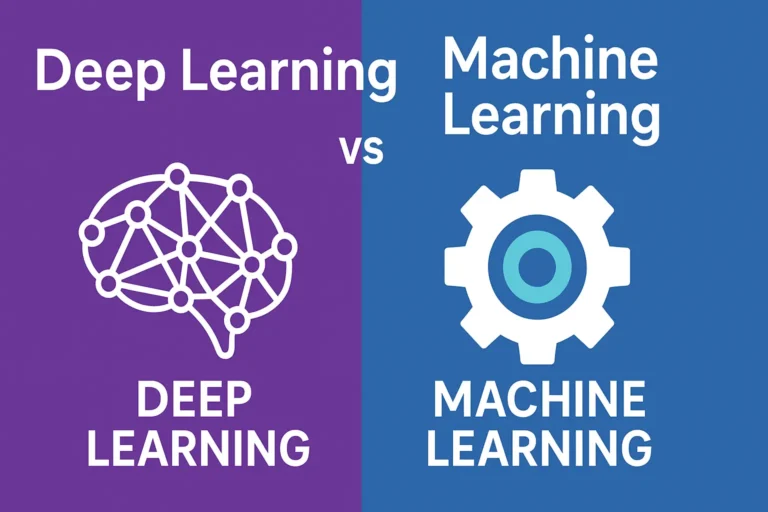
Infographic comparing Deep Learning and Machine Learning with icons of a brain and a gear, highlighting the differences between the two AI approaches

Deep Learning vs Machine Learning: Key Differences You Must Know

Are you usually confused about the difference between deep learning and machine learning? You’re not alone! These terms are frequently used interchangeably, but they are not the same. Understanding the distinctions is essential whether you’re a beginner stepping into AI or a professional aiming to sharpen your expertise. Let’s break it down everything you need to know about deep learning vs machine learning in clear, simple terms. What is Machine Learning? Machine learning is essentially about teaching a computer to recognize patterns in data without explicitly coding every rule. Think of it as showing a child hundreds of pictures of cats and dogs until they can figure out which is which on their own. Key characteristics of machine learning: Types of Machine Learning What is Deep Learning? Deep learning is a subset of machine learning, but it takes inspiration from how the human brain works. It uses artificial neural networks with many layers (hence the word “deep”) to process information. Imagine how your brain processes visual input. It passes through multiple layers of neurons, each detecting different features. Deep learning functions in a very similar way. Key characteristics of deep learning: Deep Learning vs Machine Learning: The Core Differences 1. Data Requirements 2. Feature Engineering 3. Hardware Requirements 4. Interpretability 5. Training Time When to Use Machine Learning vs Deep Learning Choose Machine Learning When: Choose Deep Learning When: Real-World Applications Machine Learning Examples: Deep Learning Examples: The Performance Factor Here’s an important insight: machine learning often outperforms deep learning on smaller datasets. But as the data gets bigger, deep learning tends to take the lead. Think of it like this: Getting Started: Which Path Should You Take? If you’re just beginning your journey in AI, start with machine learning first. Here’s why: Once you’re comfortable, you can dive into deep learning with confidence. Future Trends: What’s Next? The boundary between machine learning and deep learning continues to blur. Some exciting trends include: Conclusion Both machine learning and deep learning play vital roles in the AI landscape. The right choice depends on your data, resources, and goals. The key is to define your problem clearly before picking a tool. Don’t fall into the trap of using deep learning just because it’s trendy sometimes the simplest machine learning algorithm is exactly what you need. So, what’s your experience with machine learning vs deep learning? Have you found one more effective in your projects? Share your thoughts, I’d love to hear them!

Deep Learning vs Machine Learning: Key Differences You Must Know Read More »

top 5 best AI coding tools in 2025

Top 5 Best AI Coding Tools in 2025

The world of software development is changing faster than ever, and AI coding tools are leading the charge in 2025. These powerful assistants can help you write cleaner code, debug faster, and even plan entire architectures. Whether you’re a beginner learning your first language or a senior developer managing complex projects, the right AI tool can supercharge your productivity. Here are my top picks after years of hands-on use. 1. Claude AI – Best for Frontend Design Why it’s great for developers: Claude’s latest models (Claude 4) are exceptional at understanding project context and producing elegant, maintainable code. This is my favorite AI. It has some limits on the free plan, but it’s excellent for front-end design — incredibly creative when building UI layouts. Another thing I like is that it can generate longer content than ChatGPT. Key Features: Real-world use: I use Claude to refactor old codebases — it spots inefficiencies I’d probably miss. In recent benchmark tests, Claude 3.7 ranked among the top performers for implementation quality. Best for: Large projects, architecture design, deep code reviews. 2. ChatGPT 5 – Best for complex logic Why it’s essential: ChatGPT is one of the most popular AI tools, and with the launch of ChatGPT 5, it’s even more powerful. Trained on a massive dataset, it supports multiple languages and provides up-to-date information across various fields. It can help with everything from quick code snippets to full project prototypes. Key Features: Real-world use: I rely on ChatGPT daily for writing unit tests, explaining APIs, and exploring new frameworks. Best for: Rapid prototyping, learning new languages, brainstorming solutions. 3. Cursor AI Code IDE Nowadays, Cursor is a game-changing IDE that can transform a developer’s coding skills. Even with just basic knowledge, you can create your software or website because it can read all your project files and understand your logic. This makes it incredibly helpful for development. In the background, it uses ChatGPT (I believe), which powers its smart suggestions and assistance. Key Features: Real-world use: With Cursor, I can make project-wide changes in seconds and fix issues before they even hit the compiler. Best for: Full-stack development, managing large codebases, and AI-assisted pair programming. 4. Gemini (Google) – Best for Research & Documentation Gemini combines coding assistance with Google’s research power, making it perfect for exploring new technologies. It includes a guided-learning feature that helps you work through complex problems—you just need to provide information step by step. Plus, Gemini is integrated into the Android ecosystem, making it easily accessible on many devices. Key Features: Real-world use: I often turn to Gemini when learning a brand-new framework — it simplifies the docs and shows examples I can use right away. Best for: API integration, documentation, learning cutting-edge technologies. 5. DeepSeek R1 – Free & Open-Source Option Why it’s impressive: DeepSeek delivers GPT-level coding power for free — no sign-up, no limits, fully open-source. It has better reasoning and can create complex logic. Most importantly, you can download and install it on your local system; it will work the same as its online version. Key Features: Real-world use: While not as polished as paid tools, DeepSeek’s raw power makes it perfect for quick experiments or personal projects. Best for: Students, budget-conscious developers, open-source projects. Pro Tips to Get the Most Out of AI Coding Tools Final Thoughts This is for every developer: don’t lose your skills by depending entirely on AI. Sometimes, build your logic. AI is only as good as what we have trained it on, and it doesn’t think like we do. It’s best used for repetitive tasks where it truly excels. Use AI to Enhance Your Skills, Not Habit. AI is not replacing developers — it’s empowering us. Claude 4 Opus is already setting performance records (72.5% on SWE-Bench), and tools like Cursor are changing how we interact with code. Try them, experiment, and build your AI-powered workflow. The developers who embrace these tools now will be the ones building the future. Your turn: Which AI coding tool has made the biggest difference in your projects? Share your experience in the comments!

Top 5 Best AI Coding Tools in 2025 Read More »

Scroll to Top