Django

How to Build a Push Notification System Using Django

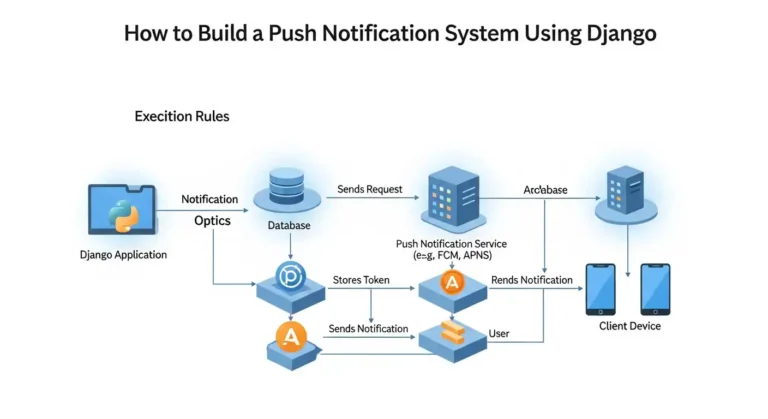
Imagine your app could send instant updates to users the moment something important happens, whether it’s a new message, an order update, or a security alert. Push notifications make this possible by delivering real-time information directly to users without requiring them to refresh the app or constantly check for updates. In modern applications, push notifications play a crucial role in improving user engagement and keeping users informed. From social media alerts to e-commerce order updates, they help create a more interactive and responsive user experience. Why Push Notifications? Push notifications help applications improve user engagement by delivering real-time updates. Some common use cases include: With Django, you can easily build a backend service that generates and sends notifications to users. Architecture Overview A typical push notification system consists of the following components: The flow looks like this: User Action → Django Backend → Save Notification → Send Push → User Device Step 1: Create a Django Project First, install Django if you haven’t already: Create a new project and app: Add the app to INSTALLED_APPS in settings.py. Step 2: Create the Notification Model Create a model to store notifications. Run migrations: This will create a database table to store notifications. Step 3: Create a Notification Service Create a utility function to generate notifications. Now you can trigger notifications anywhere in your Django project. Example: Step 4: Create an API to Fetch Notifications You may want to show notifications inside your application. Add URL: Step 5: Real-Time Notifications (Optional) For real-time notifications, you can use WebSockets with Django Channels. Install channels: Channels allow Django to push updates instantly to connected users without refreshing the page. Step 6: Sending Push Notifications to Mobile Devices If you want to send notifications to mobile apps, you can integrate with services such as: Example using Firebase: Step 7: Mark Notifications as Read You may want users to mark notifications as read. Best Practices When building a production notification system: Conclusion Building a push notification system in Django is straightforward. By creating a notification model, service layer, and API endpoints, you can manage and deliver notifications efficiently. For real-time systems, integrating Django Channels or Firebase can significantly improve user experience. Push notifications are a powerful way to keep users engaged and informed, making them a valuable addition to any modern application.

How to Build a Push Notification System Using Django Read More »

django-tenants

Building Enterprise-Grade SaaS with Django

Very few know how to build a SaaS platform that safely serves hundreds or thousands of companies from a single system. The difference is not features. It is architecture. In this article, I will focus on one critical concept used by real SaaS platforms: schema-based multi-tenancy using Django and PostgreSQL. This guide is intentionally minimal and educational.No advanced tooling. No distractions. Just the core ideas Why Multi-Tenancy Is Fundamental to SaaS Imagine you are building a project management product. You onboard 200 companies. Do you: That approach quickly becomes impossible. A SaaS platform must: This is exactly what multi-tenancy provides. The Three Ways to Implement Multi-Tenancy 1. Shared Tables with Tenant ID All tenants share the same tables. Data is filtered using a tenant_id column. This is simple, but dangerous.A single missing filter can expose data across tenants. This approach does not scale safely. 2. Shared Database, Separate Schemas (Recommended) Each tenant gets: Django connects to the correct schema per request. This gives: This article focuses on this approach. 3. Separate Database per Tenant Each tenant has a dedicated database. This offers maximum isolation but adds major operational complexity.Most SaaS platforms do not need this. Why Schema-Based Multi-Tenancy Works Isolation at the Database Level Schemas are enforced by PostgreSQL itself. Even if the application code is incorrect, the database prevents cross-tenant access.Security does not depend on developer discipline. Scales Without Rewrites You can: The architecture remains stable as the business grows. Django Code Remains Clean You write normal Django queries: Django-tenants ensures the query runs in the correct schema automatically. No tenant_id fields everywhere.No custom query filters. How Tenant Resolution Works A simplified request flow: Every request is isolated by default. Data Layout Strategy Public Schema Contains platform-level data: This answers the question: who is the customer? Tenant Schemas Each tenant schema contains: This answers the question: what belongs to this company? Essential Libraries This blog intentionally uses only the core requirements. Django The main web framework. django-tenants Handles: PostgreSQL Driver Required for PostgreSQL schema support. Essential Commands Run shared (public schema) migrations: Run migrations for all tenant schemas: Create a tenant: Create a superuser: Common Mistakes Beginners Make Most of these mistakes appear only after the system grows. Final Thoughts Enterprise SaaS is not about complexity.It is about correct boundaries. Schema-based multi-tenancy gives you: With just Django, django-tenants, and PostgreSQL, you can build a foundation capable of serving real businesses safely. Everything else can be added later. Architecture, however, is very hard to fix later. Build it right from day one. If you want next, I can: Just tell me the next chapter. Why This Matters Schema-based multi-tenancy relies on hostnames to resolve tenants.The domain resolution and middleware logic treat localhost them 127.0.0.1 as different hosts. In development, tenant routing and schema switching are configured to work with localhost. Accessing the app via 127.0.0.1 bypasses this logic, causing tenant resolution to fail.

Building Enterprise-Grade SaaS with Django Read More »

Make Your Personal Blog Website with Wagtail CMS

So I’ve been wanting to build my own blog for a while now, and after trying out a bunch of different platforms like WordPress and some CMSs, I finally found Wagtail. And honestly? It’s been pretty great. Let me tell you why I think Wagtail is perfect for a personal blog and how you can get started with it. Why I Chose Wagtail I know what you’re thinking: “There are like a million blogging platforms out there—why Wagtail?” Fair question. Here’s the thing: I wanted something flexible enough to customize, but not so complicated that I’d spend weeks just setting it up. Wagtail is very easy to set up and customize with templates, but you still get the power and flexibility you need. And Wagtail is 10x faster than a WordPress website, and because it has much batter seo feature It’s built on Django, which I already have some experience with, and it provides a really clean admin interface that doesn’t feel like it was designed in 2005. Plus, it’s open source, which means no monthly fees eating into my coffee budget. What You’ll Need Before we dive in, here’s what you should have ready: Getting Started Alright, let’s actually build this thing. First, I recommend setting up a virtual environment because you don’t want to mess up your system Python packages. Now install Wagtail: Once that’s done, create your project: That last command will ask you to create an admin account. Don’t forget those credentials – you’ll need them to log into your admin panel. Now fire it up: Go to http://127.0.0.1:8000 And boom – you’ve got a Wagtail site running. The admin panel is at http://127.0.0.1:8000/admin. Setting Up Your Blog Here’s where it gets fun. Wagtail is all about creating custom page types. For a blog, you’ll want to create models for your blog index page and individual blog posts. Create a new app for your blog: Then add it to your INSTALLED_APPS settings file. In your blog/models.py, you’ll want something like this: Run migrations again: Creating Templates Wagtail needs templates to display your pages. Create a blog/templates/blog directory and add your templates there. Here’s a simple one for blog_page.html: Adding Some Style The default Wagtail setup is pretty bare-bones, which is actually good because you can style it however you want. I added some basic CSS to make mine look decent, and I’m planning to customize it more as I go. You can put your CSS in a static folder and link it in your base template. Nothing fancy is needed unless you want to get fancy. What I Like About This Setup After using this for my own blog, here’s what I appreciate: The admin interface is actually pleasant to use. I can draft posts, schedule them, and manage everything without wanting to throw my laptop out the window. The StreamField feature (which I didn’t cover here, but you should definitely look into) lets you create really flexible page layouts. And since it’s Django under the hood, I can add any custom functionality I want. A Few Gotchas It’s not all sunshine and rainbows, though. The learning curve is steeper than something like WordPress if you’re not familiar with Python or Django. And while the documentation is pretty good, sometimes you’ll need to dig around to figure out how to do something specific. Also, deployment is on you. Wagtail doesn’t come with hosting, so you’ll need to figure that out yourself. I ended up using a simple VPS, but there are easier options like PythonAnywhere or Heroku if you don’t want to deal with server management. Final Thoughts Building a blog with Wagtail has been a really good experience for me. It’s given me way more control than I’d get with a typical blogging platform, and I actually understand how everything works. If you’re comfortable with Python and want a blog that you can customize to your heart’s content, I’d definitely recommend giving Wagtail a shot.

Make Your Personal Blog Website with Wagtail CMS Read More »

Django Tenants

Django Tenants Complete Guide: Build Scalable Multi-Tenant Applications

Everyone is curious about how large companies manage their SaaS-based software. In this blog post, I will guide you through how to use the django-tenants library to implement multi-tenancy in Django. Multi-tenancy is a software architecture where a single application instance serves multiple customers (tenants), with each tenant’s data securely isolated from others. Django-tenants is a powerful and widely used library that makes implementing multi-tenancy in Django simple and scalable. In this complete guide, you’ll learn everything you need to get started with Django Tenants—from basic concepts to practical implementation. What is Multi-Tenancy? Multi-tenancy allows you to run multiple organizations or clients on a single application deployment. Each tenant has its own isolated database schema, ensuring complete data separation while sharing the same codebase and infrastructure. Common use cases include SaaS applications, HRMS, e-learning platforms, e-commerce marketplaces, and enterprise management systems, where each client needs their own isolated environment. Real-World Companies Using Multi-Tenancy Many leading companies rely on multi-tenant architecture, including Salesforce (CRM), Shopify (e-commerce), and Slack (team communication).Internally, what they use the company didn’t do to reveal, but django Tenancy provides the same architecture Why Django-Tenants? Django-tenants provides schema-based multi-tenancy using PostgreSQL schemas. Each tenant gets their own database schema, providing strong data isolation while being more efficient than separate databases. The library handles tenant identification, routing, and database operations automatically. Prerequisites Before starting, ensure you have Python 3.8 or higher, PostgreSQL 10 or higher installed, and basic knowledge of Django. Django-tenants works best with PostgreSQL due to its schema support. Installation First, install the required packages: Create a new Django project if you haven’t already: Configuration Update your settings.py file with the following configurations. Start by modifying the database settings to use PostgreSQL: Add django-tenants to your installed apps. The order is crucial here: Configure the tenant model and middleware: Specify which apps are shared across all tenants and which are tenant-specific: Set the public schema name: Creating Tenant Models Create your tenant and domain models in tenants/models.py: The TenantMixin provides essential fields like schema_name and is_active. The auto_create_schema attribute automatically creates the database schema when a new tenant is created. Running Migrations Django-tenants requires a special migration process. First, create migrations: Run migrations for the shared apps (public schema): This creates the public schema and shared tables. Now you’re ready to create tenants. Creating Your First Tenant Create a management command or use the Django shell to create tenants. Here’s an example using the shell: Testing Your Multi-Tenant Setup Start the development server: To test different tenants, you’ll need to modify your hosts file or use different domains. For local development, add entries to your hosts file: Now you can access different tenants at tenant1.localhost:8000 and tenant2.localhost:8000. Creating Tenant-Specific Views Create views that automatically work with the current tenant’s data: The request object includes a tenant attribute that gives you access to the current tenant information. Best Practices Keep tenant-specific data in TENANT_APPS and shared data like user authentication in SHARED_APPS. Use descriptive schema names that are URL-safe and unique. Always test tenant isolation to ensure data doesn’t leak between tenants. Implement proper error handling for missing or invalid tenants. Use database connection pooling to handle multiple tenant connections efficiently. Consider implementing tenant creation workflows with proper validation. Advanced Features Django-tenants supports custom tenant routing, allowing you to use subdomains, custom domains, or path-based routing. You can implement tenant-specific settings by overriding settings based on the current tenant. The library also supports tenant cloning for quickly setting up new tenants with existing data structures. Common Pitfalls Avoid forgetting to run migrate_schemas for both shared and tenant apps. Don’t use absolute imports that bypass tenant middleware. Be careful with static files and media files, ensuring they’re properly scoped per tenant when needed. Always test migrations on a copy of your production database before deploying. Conclusion Django-tenants provides a robust solution for building multi-tenant Django applications. By following this guide, you’ve learned how to set up schema-based multi-tenancy, create and manage tenants, and build tenant-aware applications. The library handles the complexity of tenant routing and database isolation, allowing you to focus on building great features for your users. Read More on official docs.

Django Tenants Complete Guide: Build Scalable Multi-Tenant Applications Read More »

django 6

Django 6 New Features (2025): Full Breakdown with Examples

Hey everyone! Django 6.0 is finally on the horizon (expected December 2025), and I’ve been diving deep into the release notes so you don’t have to. And trust me — this isn’t just another routine version bump. The Django team has truly outdone themselves this time with powerful new features, major improvements, and some exciting changes that will shape how we build modern web apps. The Big Stuff That Actually Matters Background Tasks – Finally! Okay, can we talk about how long we’ve been waiting for this? Django now has a built-in tasks framework. No more immediately reaching for Celery or RQ the moment you need to send an email in the background. Here’s how simple it is: Now, before you get too excited – Django handles the queueing part, but you still need to manage your own workers. Think of it as Django giving you the tools, but you bring the infrastructure. It’s a great foundation, though, and the built-in backends are perfect for development. Content Security Policy Support Remember when implementing CSP felt like writing a master’s thesis? Not anymore. Django 6.0 has built-in CSP support that actually makes sense. That’s it. No third-party packages, no hair-pulling. Just clean, Pythonic configuration. The middleware handles everything, including automatic nonce generation for your scripts. Template Partials This one’s for everyone who’s been using {% include %} tags and feeling like there should be a better way. Template partials let you define reusable fragments right in your template: You can even reference them from other templates using template_name#partial_name syntax. It’s like components, but without the overhead. If you’ve been using django-template-partials, there’s a migration guide to help you switch over. The Python 3.12+ Move Here’s the thing – Django 6.0 drops support for Python 3.10 and 3.11. I know, I know, upgrading Python versions is always a pain. But honestly? Python 3.12 brought some solid performance improvements, and this is probably the push you needed anyway. If you’re still on 3.10 or 3.11, stick with Django 5.2 until you’re ready to upgrade. It’s LTS and will be supported until April 2026. The Little Things That’ll Make Your Day Modern Email API Django finally moved to Python’s modern email API. If you’ve ever had to deal with email encoding issues (and who hasn’t?), you’ll appreciate this. Everything’s cleaner, more Unicode-friendly, and just… works better. Better Pagination for Async AsyncPaginator and AsyncPage are here. If you’re building async views, you no longer have to wrap your pagination in sync_to_async. It’s the little things, you know? Template Improvements Admin Upgrades Font Awesome 6.7.2 icons across the admin interface. Subtle, but it looks sharp. Also, you can now customize the password change form with AdminSite.password_change_form. The Stuff That Might Break Things Look, I’m not going to sugarcoat it. There are some breaking changes: Should You Upgrade? If you’re on Django 5.2 and already using Python 3.12+? Absolutely. The new features are worth it, and the upgrade path is pretty smooth. If you’re on an older version? Maybe wait for 6.0.1 or 6.0.2. Let the early adopters find the edge cases first. There’s no shame in that – it’s just smart. If you’re on the 4.2 LTS? You’ve got until April 2026, so no rush. But start planning your upgrade path now. The Bottom Line Django 6.0 feels like the framework is maturing in all the right ways. Built-in background tasks, proper CSP support, template partials – these are things the community has been solving with third-party packages for years. Bringing them into the core just makes sense. Is it revolutionary? No. Is it solid, practical, and exactly what Django needed? Absolutely. The release is expected in December 2025, with the beta already available. If you want to help test it (and you should), grab the release candidate and give it a spin in a non-production environment. What are you most excited about? Let me know in the comments. I’m personally thrilled about the tasks framework – goodbye Celery boilerplate! Update: Make sure to check the full release notes for all the details, deprecations, and migration guides. There’s way more than I could cover here.

Django 6 New Features (2025): Full Breakdown with Examples Read More »

image of many to many relation in Django

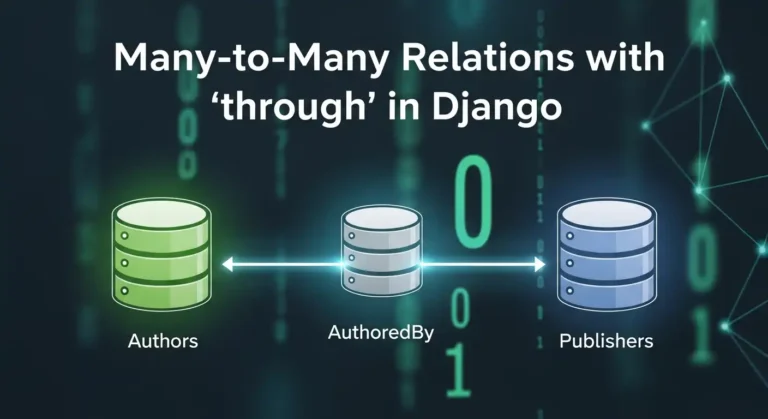
Many-to-Many Relations with ‘through’ in Django

Hey there! If you’ve been working with Django for a while, you’ve probably used many-to-many relationships. They’re great, right? But have you ever felt like you needed more control over that relationship? Like, you want to store extra information about the connection between two models? That’s exactly where the through parameter comes in, and trust me, once you get the hang of it, you’ll wonder how you ever lived without it. What’s a Many-to-Many Relationship Anyway? Before we dive into the through stuff, let’s quickly recap. A many-to-many relationship is when multiple instances of one model can be related to multiple instances of another model. Think about it like this: You get the idea! The Basic Many-to-Many Setup Usually, you’d set up a many-to-many relationship like this: Django automatically creates an intermediate table behind the scenes to handle this relationship. Easy peasy! But here’s the thing – what if you want to store more information about the enrollment? Like when the student enrolled, what grade they got, or whether they’ve completed the course? Enter the ‘through’ Parameter This is where the magic happens. The through The parameter lets you create your own intermediate model with whatever extra fields you want. Here’s how it works: See what we did there? We told Django: “Hey, use this Enrollment model to manage the relationship between Student and Course.” Why Would You Want to Do This? Here are some real-world scenarios: 1. Social Media App: You have Users and Groups. The membership can have a role (admin, moderator, member) and a join date. 2. E-commerce Platform Products and Orders. The intermediate table stores quantity, price at time of purchase, and any discounts applied. 3. Project Management Employees and Projects. You want to track the role of each employee in each project and the hours they’ve worked. 4. Recipe App: Recipes and Ingredients. The intermediate table holds the quantity and measurement unit for each ingredient. How to Work with Through Models Creating Relationships You can’t use the simple add() method anymore. You need to create instances of your “through” model directly: Querying Relationships You can query in both directions: Filtering with Extra Fields Here’s where it gets really cool: Important Things to Remember 1. ForeignKey Fields are Required. Your through model MUST have foreign keys to both models in the relationship. 2. unique_together. Usually, you want to prevent duplicate relationships, so use unique_together in the Meta class. 3. No Direct add(), create(), or set(). When using a through model, you can’t use these shortcuts. You have to create instances of the through model directly. 4. Removal Still Works. You can still use remove() and clear(): Complex Example Let’s say you’re building a music streaming app: Now you can do cool stuff like: Common Problems to Avoid 1. Forgetting to Create the Through Instance. Don’t try to use add() – it won’t work! 2. Not Using unique_together. You might end up with duplicate relationships, which can cause weird bugs. 3. Making the Through Model Too Complex: Keep it focused on the relationship. If you’re adding tons of fields, maybe they belong in one of the main models instead. 4. Circular Import Issues. If you reference models as strings (like through=’Enrollment’), make sure the model is defined in the same file or properly imported. When NOT to Use Through You don’t always need a through model! Use the simple many-to-many if: Remember: premature optimization is the root of all evil. Don’t overcomplicate things if you don’t need to! Wrapping Up The through parameter in Django’s many-to-many relationships is super powerful. It gives you complete control over intermediate tables and lets you model complex real-world relationships accurately. Start simple, and add complexity only when you need it. Your future self (and your teammates) will thank you for keeping things as straightforward as possible while still meeting your requirements. Now go ahead and build something awesome! And remember, every complex relationship in your database is just a bunch of simple relationships working together.

Many-to-Many Relations with ‘through’ in Django Read More »

Real questions from my recent Python Developer interview

Interview Questions I Faced for a Python Developer

Hi guys, recently I gave an interview at a startup company. I can’t reveal their name, but I am posting the questions they asked me. It was a Python Developer interview, but they also asked questions from Django, MySQL, and JavaScript. 1. What is a Django Signal? A Django signal is a messaging system that allows certain parts of your application to send notifications (signals) when an action occurs, and other parts of the app can listen and react to those events automatically. In Other words:Signals let you run some code whenever something happens in Django (like after a user is saved, deleted, or logged in). 2. How does map() work in JavaScript? map() is an array method that loops through each element, applies a function, and returns a new array without modifying the original. Example: 3. What is Django ORM? Django ORM is Object Relational Mapper that lets you interact with the database using Python instead of SQL. Example: 4. What is a Trigger in SQL? A trigger is an automatic block of SQL code that runs when you insert, update, or delete data in a table. Used for logs, validation, and audits. 5. Example of One-to-Many relationship in Django ORM 6. Difference between REST API and SOAP API SOAP is a strict, XML-based protocol with built-in security REST is a lightweight, flexible API style using JSON. REST SOAP Flexible Strict JSON/XML XML Only Lightweight Heavy No WSDL Uses WSDL Quick Slower Keep it short in interviews. 7. How do you authenticate a REST API? You can authenticate REST APIs using: Mention JWT, it’s the most popular. 8. DDL – Data Definition Language DDL (Data Definition Language) is a type of SQL command used to define, create, modify, and delete database structures such as tables, indexes, schemas, and views. Commands: Deals with tables, columns, and schemas. 9. DML – Data Manipulation Language DML (Data Manipulation Language) is a set of SQL commands used to insert, update, delete, and retrieve data from a database. Commands:  Changes data, not structure. 10. How you write a custom SQL query in django Django provides a connection.cursor() functionality, and by using this cursor, we can write and execute custom SQL queries directly. For example:

Interview Questions I Faced for a Python Developer Read More »

python dictionaries

Unlocking Python Dictionaries: A Beginner’s Guide to Adding New Keys

Think of a dictionary as a real-life address book. You don’t flip through every page to find someone; you look up their name (key) to instantly get their address (value). Dictionaries work the same way, storing data in key: value pairs for lightning-fast retrieval. But what happens when you get a new friend and need to add them to your address book? You just added a new entry! Similarly, in Python, you often need to add new keys to a dictionary. This blog post will guide you through the different ways to do just that, making you a dictionary master in no time. Method 1: The Straightforward Way – Using Square Brackets [] This is the most common and intuitive method. The syntax is simple: my_dictionary[new_key] = new_value If the new_key doesn’t exist, Python happily adds it to the dictionary. If it does exist, Python updates its value. It’s a two-in-one operation! Example: See? It’s as easy as assigning a value to a variable. Method 2: The Safe Bet – Using the .get() Method Sometimes, you’re not sure if a key exists. You might want to add a key only if it’s not already present. Using [] directly would overwrite the existing value, which might not be what you want. This is where the .get() method shines. While .get() it is primarily used for safe retrieval, we can use the logic it provides to conditionally add a key. Example: This method prevents accidental data loss. Method 3: The Powerful Update – Using the .update() Method What if you need to add multiple keys at once? The .update() method is your best friend. It can merge another dictionary or an iterable of key-value pairs into your original dictionary. Example 1: Merging Two Dictionaries Example 2: Using an Iterable Just like the [] method, if any of the new keys already exist, .update() will overwrite their values. Method 4: The Modern Approach – Using the “Walrus Operator” := (Python 3.8+) This is a more advanced technique, but it’s elegant for specific scenarios. The Walrus Operator := allows you to assign a value to a variable as part of an expression. It’s useful when you want to check a condition based on the new value you’re about to add. Example: Note: This is a more niche use case, but it’s good to know it exists! A Real-World Example: Building a Shopping Cart Let’s tie it all together with a practical example. Imagine you’re building a simple shopping cart for an e-commerce site. Output: This example shows how you can use all three primary methods in a cohesive, real-world scenario. Summary: Which Method Should You Use? Now you’re equipped to dynamically build and modify dictionaries in your Python projects. Go forth and code! Remember, the key to mastering dictionaries is practice.

Unlocking Python Dictionaries: A Beginner’s Guide to Adding New Keys Read More »

django sped up image

How I made my Django project almost as fast as FastAPI

FastAPI runs on Uvicorn, an ASGI server made for Python code that runs at the same time. Django is older and has more features, but from version 3.0, it can also operate on ASGI with Uvicorn. Once you set up Django on Uvicorn and make queries and caching work better, you can get the same speed for most things. 1. Start Django with Uvicorn The best way to improve performance is to switch to an ASGI server. Install Uvicorn Make sure your project has a asgi.py file, which is made automatically in Django 3+. Then turn on the server: uvicorn myproject.asgi:application –host 0.0.0.0 –port 8000 –workers 4 Why Uvicorn If you use a process manager like Supervisor or systemd, you can add: 2. Use async views where possible Why use httpx instead of requests: It lets you send HTTP requests (GET, POST, etc.) and handle responses, similar to requests, but it also supports asynchronous programming (async/await). That means you can make many API calls at once without blocking your Django or FastAPI app, ideal for performance and concurrency. import httpx from django.http import JsonResponse async def price_view(request): async with httpx.AsyncClient() as client: r = await client.get(‘https://api.example.com/price’) return JsonResponse(r.json()) For ORM queries, still use sync code or wrap it with sync_to_async: from asgiref.sync import sync_to_async from django.contrib.auth.models import User @sync_to_async def get_user(pk): return User.objects.get(pk=pk) async def user_view(request): user = await get_user(1) return JsonResponse({‘username’: user.username}) 3. Optimize your database Example: posts = Post.objects.select_related(‘author’).all() 4. Enable caching with Redis Install Redis and configure Django: pip install django-redis Add this to settings.py: CACHES = { ‘default’: { ‘BACKEND’: ‘django_redis.cache.RedisCache’, ‘LOCATION’: ‘redis://127.0.0.1:6379/1’, ‘OPTIONS’: { ‘CLIENT_CLASS’: ‘django_redis.client.DefaultClient’, } } } Cache heavy views: from django.views.decorators.cache import cache_page @cache_page(60) def home(request): return render(request, ‘home.html’) 5. Offload background work Use Celery or Dramatiq to handle slow tasks like emails or large file uploads asynchronously. 6. Serve static files efficiently Use WhiteNoise for small deployments or a CDN (Cloudflare, S3 + CloudFront) for large ones. MIDDLEWARE = [ ‘django.middleware.security.SecurityMiddleware’, ‘whitenoise.middleware.WhiteNoiseMiddleware’, # … ] 7. Monitor performance Example Benchmark Running the same Django app under Uvicorn vs Gunicorn (WSGI): Server Avg Latency Req/s Gunicorn (WSGI) 90 ms 700 Uvicorn (ASGI) 40 ms 1400 Final Thoughts FastAPI may always win in pure async benchmarks, but Django + Uvicorn can be nearly as fast for most production workloads — and you keep Django’s ORM, admin, and ecosystem. Checklist:

How I made my Django project almost as fast as FastAPI Read More »

Python Django job scraper workflow with BeautifulSoup, TimesJobs, and Google Sheets integration.

How I Built a Django Job Scraper that Saves to Google Sheets

Last month, I got stuck in the usual routine: job boards were checked by hand, listings were copied into spreadsheets, and the best opportunities were always missed. After too many hours were spent on this boring work, a thought came up – why not have the whole process automated? So, I started thinking about creating a Django project that could scrape and automate job listings from websites like LinkedIn and Indeed. However, after trying multiple ways to scrape data from sites like Indeed, I got stuck because most big websites have bot protections that prevent scraping. I even tried using Selenium, but it didn’t work reliably. Ultimately, I used BeautifulSoup4 and the requests library to extract the data. I scraped data from the TimesJobs website and saved it both in a Google Sheet and in a Django SQLite database. The Problem That Drove Me Crazy Every morning, I would open 5–6 different job boards, search for the same keywords, scroll through hundreds of listings, and manually copy the good ones into my tracking spreadsheet. By the time I was done, I was already mentally exhausted—before even starting to write cover letters. The worst part? I kept missing jobs that were posted while I was sleeping or busy with other tasks. Some great opportunities would disappear before I even got a chance to see them. I knew there had to be a better way. What I Built (And Why It Actually Works) My solution is pretty straightforward: a Python script, built with Django, that automatically scrapes job listings from multiple sources and saves everything into a Google Sheet and a SQLite database. But here’s what makes it actually useful: The Tech Stack (Nothing Too Fancy) I kept things simple because, honestly, I wanted something I could maintain without pulling my hair out: Lessons I Learned the Hard Way Rate limiting is real: I got blocked from a few sites in the first week because I was being too aggressive with requests. Had to add delays and retry logic. Websites change their structure: What worked perfectly in January broke in February when one site redesigned its job listing pages. Now I build in more flexibility from the start. Google Sheets API has quotas: You can’t just hammer their API endlessly. I learned to batch my updates and cache data locally. Job descriptions are messy: The amount of inconsistent HTML and weird formatting in job posts is honestly astounding. Cleaning this data took way more time than I expected. Want to Build Your Own? Here’s a step-by-step guide to building a Django project that scrapes job listings using BeautifulSoup4 and requests, and saves the data in both Google Sheets and your Django models: 1. Set Up Your Django Project pip install django django-admin startproject jobscraper cd jobscraper python manage.py startapp jobs 2. Create Your Job Model Define a model to store job listings in jobs/models.py: from django.db import models class Job(models.Model): title = models.CharField(max_length=255) company = models.CharField(max_length=255, blank=True, null=True) location = models.CharField(max_length=255, blank=True, null=True) experience = models.CharField(max_length=100, blank=True, null=True) salary = models.CharField(max_length=100, blank=True, null=True) posted = models.CharField(max_length=100, blank=True, null=True) description = models.TextField(blank=True, null=True) skills = models.TextField(blank=True, null=True) # store as comma-separated string link = models.URLField(unique=True) # prevent duplicates created_at = models.DateTimeField(auto_now_add=True) def __str__(self): return f”{self.title} at {self.company}” python manage.py makemigrations python manage.py migrate 3. Scrape Job Listings with BeautifulSoup4 and Requests pip install beautifulsoup4 requests gspread oauth2client def scrape_jobs(): url = “https://www.timesjobs.com/candidate/job-search.html?searchType=personalizedSearch&from=submit&txtKeywords=Python+developer&txtLocation=India” response = requests.get(url, headers={“User-Agent”: “Mozilla/5.0”}) soup = BeautifulSoup(response.text, “html.parser”) container = soup.find(“ul”, class_=”new-joblist”) if not container: print(“No job list found!”) return [] cards = container.find_all(“li”, class_=”clearfix job-bx wht-shd-bx”) print(f”Found {len(cards)} jobs”) jobs = [] for card in cards: job_data = parse_job_card(card) # Save if not exists if not Job.objects.filter(link=job_data[“link”]).exists(): Job.objects.create( title=job_data[“title”], company=job_data[“company”], location=job_data[“location”], experience=job_data[“experience”], salary=job_data[“salary”], posted=job_data[“posted”], description=job_data[“description”], skills=”, “.join(job_data[“skills”]), # convert list to string link=job_data[“link”], ) jobs.append(job_data) return jobs 4. Save Data to Google Sheets Log in to your Gmail and open Google Cloud. Create a New Project and Enable Google Sheets API and Google Drive API. Create Service Account Credentials. Generate a JSON Key File. Share your Google Sheet with the Service Account email as editor. import gspread from oauth2client.service_account import ServiceAccountCredentials from django.conf import settings def get_google_sheet(): scope = [“https://spreadsheets.google.com/feeds”, “https://www.googleapis.com/auth/drive”] creds = ServiceAccountCredentials.from_json_keyfile_name( settings.GOOGLE_SHEET_CREDENTIALS, scope ) client = gspread.authorize(creds) sheet = client.open(settings.GOOGLE_SHEET_NAME).sheet1 return sheet def update_sheet(job_data): sheet = get_google_sheet() existing = sheet.get_all_values() existing_links = {row[3] for row in existing[1:]} if len(existing) > 1 else set() # Add header if sheet is empty if not existing: sheet.append_row([“Title”, “Company”, “Location”, “Link”]) for job in job_data: if job[“link”] not in existing_links: # avoid duplicates sheet.append_row([job[“title”], job[“company”], job[“location”], job[“link”]]) 5. Automate It You can run the scraper periodically using Django management commands or a cron job. See the full code I have shared my full code download here: Final Thoughts Building this scraper turned out to be one of those projects that felt much more complicated at the start than it actually was. The hardest part was simply taking the first step. If you’re spending hours manually tracking job postings, I’d strongly recommend automating the process. Your future self will thank you—and you’ll have more energy to focus on what truly matters: writing strong applications and preparing for interviews. Have you automated any part of your job search? I’d love to hear about your experiences in the comments below.

How I Built a Django Job Scraper that Saves to Google Sheets Read More »

Scroll to Top