pandas

The Power of Python: Real-World Project Ideas illustrated with laptop, Python logo, and project icons.

The Power of Python: Real-World Project Ideas

When people ask why I love Python, my answer is simple: it’s not just a programming language, it’s a toolbox for turning my ideas into reality. Python is beginner-friendly, versatile, and powerful enough to run everything from a tiny script on your laptop to large-scale systems powering global companies. But here’s the catch: learning Python by just reading syntax or following tutorials can feel… incomplete. The real magic happens when you build real-time projects, things you can see, use, and maybe even share with others. Projects push you to connect concepts, face real challenges, and gain the confidence that you’re not just “learning Python,” you’re using it. So, let’s talk about some real-world project ideas you can start with, depending on your interests. Use FastAPI for real-time chat, and django is the best framework for other projects. 1. Email and file automation Repetitive tasks are the enemy of productivity. Luckily, Python is perfect for automating them. You’ll be surprised at how empowering it feels when your code saves you time in the real world. 2. Blog Website Every developer needs a place to share their thoughts, projects, and journey. Why not build your own blog? The bonus? You learn backend logic and how to make something visually appealing. Plus, it doubles as your portfolio. 3. E-Commerce with Payment Integration Imagine running your mini Amazon-style site built with Python! This type of project will expose you to real-world concepts like authentication, databases, and secure transactions, things every serious developer should know. 4. Social Media App Social media powers our world. Building even a simplified version teaches you so much. You don’t need to reinvent Instagram or Twitter. Even a basic version is a fantastic learning experience in how large-scale platforms actually work. 5. Real-Time Chat App with WebSockets Chat apps are a perfect introduction to real-time communication. It’s one of those projects that feels “alive” because you’re building something interactive. 6. Data Analysis & Visualization Python shines when it comes to working with data. This isn’t just coding—it’s storytelling with data. Use streamlit for data visualization. 7. Movie Recommendation System This one’s always a crowd pleaser. It’s a cool project because people can actually interact with it, and it’s a great intro to AI without being overwhelming. 8. Fun & Creative Projects Not every project has to be “serious.” Some of the best learning happens when you’re just having fun. Quirky projects often keep you motivated when the “serious” ones get too heavy. Final Thoughts Python is powerful not because it’s the fastest or most complex language, but because it’s accessible and opens doors to so many areas of automation, web, data, AI, and even fun side projects. The best advice I can give is this: start small, but start today. Pick one idea from the list above and build it. It doesn’t have to be perfect; in fact, it won’t be perfect. And that’s the point. Every project teaches you something new. Before long, you’ll have a portfolio that doesn’t just show code, it shows creativity, problem-solving. Let me know which project you’re creating.

The Power of Python: Real-World Project Ideas Read More »

Top 20 Python Libraries

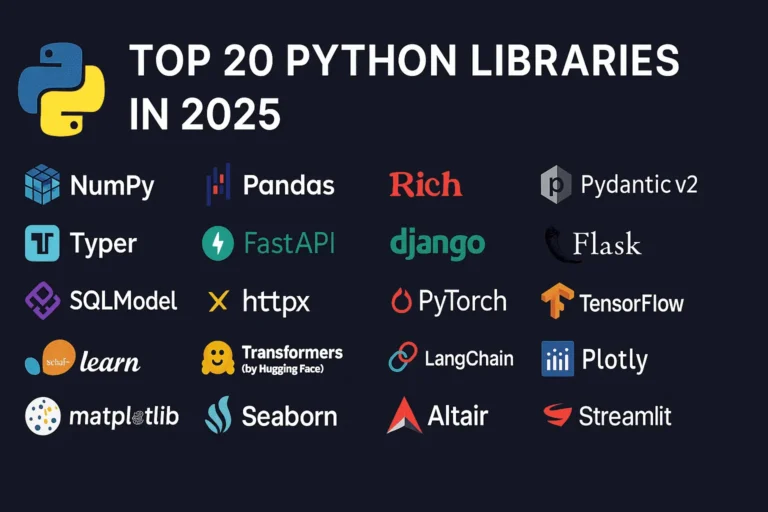
Top 20 Python Libraries for 2025

Python continues to dominate the programming landscape in 2025, and much of its success stems from its incredible ecosystem of libraries. Whether you’re building web applications, diving into machine learning, or creating stunning data visualizations, there’s a Python library that can accelerate your development process. In this comprehensive guide, we’ll explore the 20 most essential Python libraries that every developer should know about in 2025, organized by their primary use cases. General Purpose & Utilities 1. NumPy – The Foundation of Scientific Computing NumPy remains the bedrock of Python’s scientific computing ecosystem. It provides support for large, multi-dimensional arrays and matrices, along with a collection of mathematical functions to operate on these arrays efficiently. Why it matters in 2025: Use cases: Scientific computing, data analysis, image processing, financial modeling 2. Pandas – Data Manipulation Made Easy Pandas is the go-to library for data analysis and manipulation. It provides data structures like DataFrames and Series that make working with structured data intuitive and powerful. Key features: Use cases: Data cleaning, exploratory data analysis, financial analysis, business intelligence 3. Rich – Beautiful Terminal Output Rich has revolutionized how we think about terminal applications. It brings rich text, tables, progress bars, and even images to the command line. What makes it special: Use cases: CLI applications, debugging output, terminal dashboards, developer tools 4. Pydantic v2 – Type-Safe Data Validation Pydantic v2 represents a major leap forward in Python data validation. Built on Rust for performance, it uses Python type hints to validate data at runtime. Why developers love it: Use cases: API development, configuration management, data parsing, form validation 5. Typer – Modern CLI Development Typer makes creating command-line applications as easy as writing functions. From the creators of FastAPI, it brings the same elegant design philosophy to CLI development. Standout features: Use cases: Command-line tools, automation scripts, developer utilities, system administration Web Development 6. FastAPI – The Future of Web APIs FastAPI has quickly become the preferred choice for building modern web APIs. It combines high performance with developer-friendly features and automatic API documentation. What sets it apart: Use cases: REST APIs, microservices, real-time applications, machine learning APIs 7. Django – The Web Framework for Perfectionists Django remains a powerhouse for full-stack web development. Its “batteries included” philosophy and robust ecosystem make it ideal for complex applications. Core strengths: Use cases: Content management systems, e-commerce platforms, social networks, enterprise applications 8. Flask – Lightweight and Flexible Flask continues to be popular for developers who prefer a minimalist approach. Its simplicity and flexibility make it perfect for smaller applications and microservices. Why it endures: Use cases: Microservices, API prototypes, small to medium web applications, educational projects 9. SQLModel – The Modern ORM SQLModel represents the evolution of database interaction in Python. Created by the FastAPI team, it combines the best of SQLAlchemy and Pydantic. Revolutionary features: Use cases: Modern web APIs, type-safe database operations, FastAPI applications 10. httpx – Async HTTP Client httpx is the modern replacement for the requests library, bringing full async support and HTTP/2 capabilities to Python HTTP clients. Advanced capabilities: Use cases: Async web scraping, API integrations, microservice communication, concurrent HTTP requests Machine Learning & AI 11. PyTorch – Deep Learning PyTorch has established itself as the leading deep learning framework, particularly in research communities. Its dynamic computation graphs and Pythonic design make it incredibly intuitive. Key advantages: Use cases: Deep learning research, computer vision, natural language processing, reinforcement learning 12. TensorFlow – Production-Ready ML TensorFlow remains a cornerstone of machine learning, especially for production deployments. Google’s backing and comprehensive ecosystem make it a solid choice for enterprise ML. Enterprise features: Use cases: Production ML systems, mobile ML applications, large-scale deployments, computer vision 13. scikit-learn – Traditional ML scikit-learn is the gold standard for traditional machine learning algorithms. Its consistent API and comprehensive documentation make it accessible to beginners and powerful for experts. Comprehensive toolkit: Use cases: Traditional ML projects, data science competitions, academic research, business analytics 14. Transformers (Hugging Face) – NLP Revolution Transformers has democratized access to state-of-the-art NLP models. The library provides easy access to pre-trained models like BERT, GPT, and T5. Game-changing features: Use cases: Text classification, language generation, question answering, sentiment analysis 15. LangChain – LLM Application Framework LangChain is the go-to framework for building applications powered by large language models. It provides abstractions for chaining LLM calls and building complex AI workflows. Powerful abstractions: Use cases: Chatbots, document analysis, AI agents, question-answering systems Data Visualization 16. Plotly – Interactive Visualization Plotly leads the way in interactive data visualization. Its ability to create publication-quality plots that work seamlessly in web browsers makes it invaluable for modern data science. Interactive capabilities: Use cases: Dashboard creation, scientific publications, financial analysis, interactive reports 17. Matplotlib – The Visualization Foundation Matplotlib remains the foundation of Python visualization. While other libraries offer more modern interfaces, matplotlib’s flexibility and comprehensive feature set keep it relevant. Enduring strengths: Use cases: Scientific publications, custom visualizations, academic research, detailed plot customization 18. Seaborn – Statistical Graphics Made Beautiful Seaborn builds on matplotlib to provide a high-level interface for creating attractive statistical graphics. It’s particularly strong for exploratory data analysis. Statistical focus: Use cases: Exploratory data analysis, statistical reporting, correlation analysis, distribution visualization 19. Altair – Grammar of Graphics Altair brings the grammar of graphics to Python, allowing for declarative statistical visualization. It’s particularly powerful for quick data exploration. Declarative approach: Use cases: Rapid prototyping, data exploration, statistical analysis, simple interactive plots 20. Streamlit – Data Apps in Minutes Streamlit has revolutionized how data scientists share their work. It allows you to create beautiful web applications with just Python code, no web development experience required. I have created a dashboard with Streamlit blog, please see here. Rapid development features: Use cases: Data science prototypes, ML model demos, internal tools, executive dashboards Choosing the Right Libraries for Your Project When selecting libraries for your Python projects in 2025, consider these factors: Web Development: Data Science: AI Applications: CLI Tools: The Future of Python Libraries

Top 20 Python Libraries for 2025 Read More »

Top 5 Python libraries every developer should master in 2025

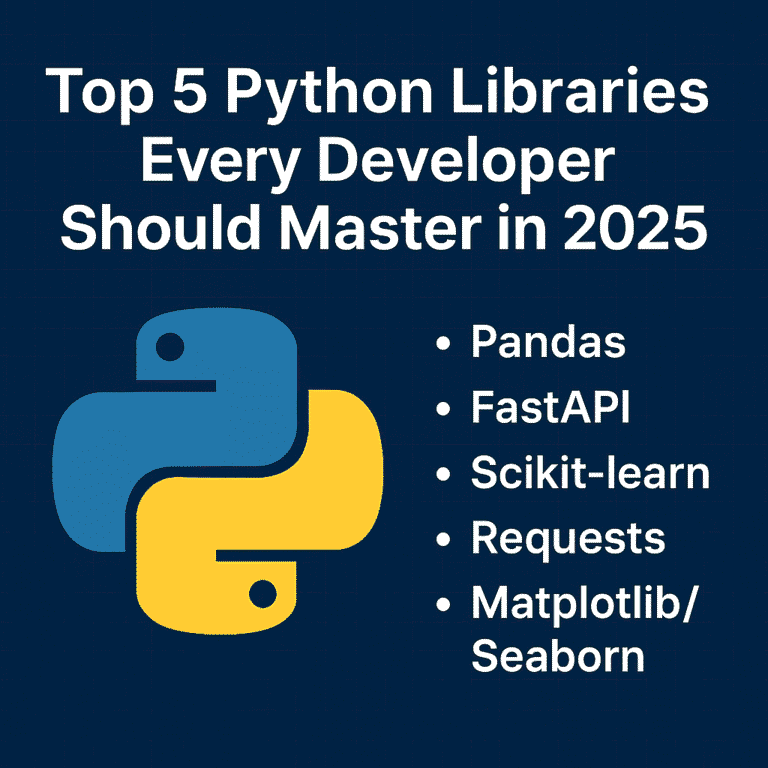
Top 5 Python Libraries Every Developer Should Master in 2025

As we move further into 2025, Python continues to be one of the most popular programming languages in the world. Its clean syntax, vibrant community, and powerful libraries make it a favorite among industry developers—from web development and data science to AI, automation, and beyond. But Python’s true strength lies in its ecosystem. With the right libraries, you can do more with less code—faster, cleaner, and more efficiently. Whether you’re just starting your Python journey or looking to sharpen your existing skills, here are five essential libraries every Python developer should know this year. 1. Pandas – Your Go-To Tool for Data Manipulation In today’s data-driven world, knowing how to work with data is a must—and Pandas makes it easy. It’s the standard library for handling structured data in Python and is widely used in fields like data science, finance, web development, and machine learning. Why Learn Pandas: Real-world uses: Data analysis, reporting dashboards, cleaning raw datasets, and even feeding machine learning models. 2. FastAPI – The New Standard for Building APIs FastAPI is quickly becoming the framework for building modern web APIs in Python. It’s fast (really fast), easy to use, and comes with automatic documentation out of the box. Why Developers Love FastAPI: Why it matters in 2025: More and more apps are going API-first. FastAPI helps you build scalable, production-ready APIs that integrate easily with frontend and mobile apps. 3. Scikit-learn – Machine Learning Made Simple Scikit-learn is the perfect place to start if you’re curious about machine learning. It abstracts away the complexity of ML algorithms and provides a consistent interface for quickly trying things. What You Can Do with It: Why learn it: Even if you’re not a full-time data scientist, understanding ML basics can give your apps a smarter edge. 4. Requests – The Simplest Way to Talk to the Web Every app these days needs to fetch or send data from somewhere—APIs, websites, services. The requests The library makes working with HTTP super simple and intuitive. Why Requests are a Must-Have: Use Cases: Calling external APIs (like weather, payment, or social media), scraping data, automating web interactions, or even testing your backend services. 5. Matplotlib & Seaborn – Visualize Like a Pro Data is only useful when you can understand and communicate it. That’s where Matplotlib and Seaborn come in. Learn to: Why it’s essential: Visualization helps you (and others) make better decisions based on your data. Whether it’s a report for your boss or a dashboard for your users, good visuals matter. Bringing It All Together These five libraries cover the entire journey of modern Python development: Mastering this toolkit gives you the power to build full-stack data-driven applications, from scratch to production. How to Start Learning (A 10-Week Roadmap) Here’s a simple plan you can follow: Conclusion The Python ecosystem is vast, but you don’t need to learn everything. These five libraries form a solid foundation that will serve you in almost every tech role—whether you’re building apps, analyzing data, or exploring AI. Start with one library and build something small. If you want to combine all of these, consider using the Streamlit library to quickly build dashboards. Keep going—the skills you develop now will open doors throughout your career. Follow my Streamlit blog.

Top 5 Python Libraries Every Developer Should Master in 2025 Read More »

How I Built a COVID-19 Dashboard in 10 Minutes Using Streamlit

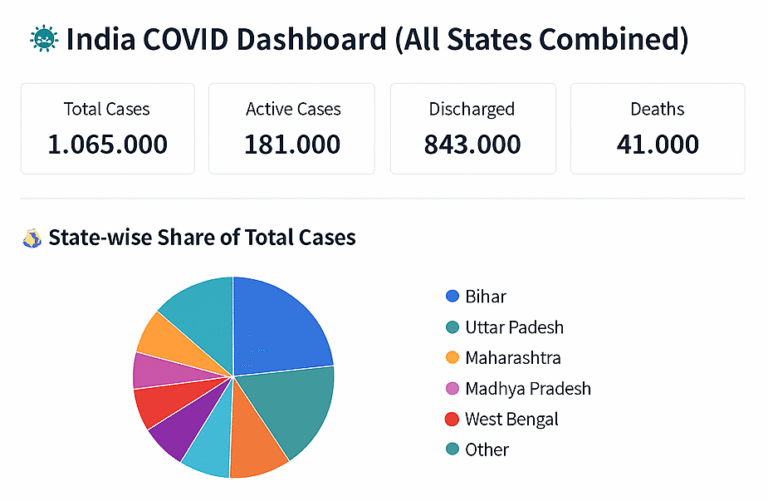
Streamlit is a Python library that lets you build web apps super easily. Think of it as a way to turn your Python scripts into interactive websites without having to learn web development. So imagine you’ve got some data analysis code or a machine learning model, and you want to show it off or let people play around with it. Normally, you’d need to learn HTML, CSS, JavaScript – all that web stuff. With Streamlit, you just write Python, and it handles the web part for you. You can add things like sliders, buttons, file upload boxes, and charts with just a few lines of code. When someone moves a slider or uploads a file, your app automatically updates. It’s pretty neat. The best part is how fast you can go from idea to working app. You write your Python code, add some Streamlit commands, and boom – you’ve got a web app running locally. Want to share it? Deploy it to their free hosting service. It’s become popular with data scientists and anyone doing machine learning because you can quickly create demos of your models or build dashboards to visualize data. No need to bug the web dev team or spend weeks learning React or whatever. The code is surprisingly simple, too – you’re just adding commands like st.slider() or st.chart() to your existing Python code, and Streamlit figures out how to turn that into a web interface. 🛠 Tools & Libraries pip install streamlit pandas plotly Step 1: Prepare Your CSV Data Create a file named covid_data.csv With the following columns: State,Zone,Total Cases,Active,Discharged,Deaths,Active Ratio,Discharge Ratio,Death Ratio,Population Bihar,Red,10000,2000,7500,500,20,75,5,120000000 Delhi,Orange,8000,1000,6500,500,12.5,81.25,6.25,20000000 … Step 2: Create the Streamlit App (app.py) 1. Import the Libraries pythonCopyEditimport streamlit as st import pandas as pd import plotly.express as px 2. Load the CSV Data pythonCopyEditdf = pd.read_csv(“covid_data.csv”) This line reads the covid_data.csv file into a DataFrame called dfSo we can work with it in the app. 3. Page Configuration pythonCopyEditst.set_page_config(page_title=”India COVID Dashboard”, layout=”wide”) st.title(“🦠 India COVID Dashboard (All States Combined)”) 4. Calculate Metrics pythonCopyEdittotal_cases = df[“Total Cases”].sum() active_cases = df[“Active”].sum() discharged = df[“Discharged”].sum() deaths = df[“Deaths”].sum() These lines add up the columns across all rows to get the total national numbers. 5. Show the Metrics in 4 Columns pythonCopyEditcol1, col2, col3, col4 = st.columns(4) col1.metric(“Total Cases”, f”{total_cases:,}”) col2.metric(“Active Cases”, f”{active_cases:,}”) col3.metric(“Discharged”, f”{discharged:,}”) col4.metric(“Deaths”, f”{deaths:,}”) 6. Draw a Pie Chart pythonCopyEditst.subheader(“State-wise Share of Total Cases”) pie = px.pie(df, names=”State”, values=”Total Cases”, title=”Total Cases by State”) st.plotly_chart(pie, use_container_width=True) 7. Draw a Bar Chart pythonCopyEditst.subheader(“State-wise Breakdown of Active, Discharged, and Deaths”) bar = px.bar( df, x=”State”, y=[“Active”, “Discharged”, “Deaths”], barmode=”group”, title=”State-wise Case Category”, height=500 ) st.plotly_chart(bar, use_container_width=True) 8. Optional Data Filter and Table pythonCopyEditwith st.expander(“Show/Filter State-Wise Data”): selected_states = st.multiselect(“Select States to View”, df[“State”].unique(), default=df[“State”].unique()) filtered_df = df[df[“State”].isin(selected_states)] st.dataframe(filtered_df.sort_values(“Total Cases”, ascending=False), use_container_width=True) Step 3: Run the App In your terminal, run: streamlit run app.py Your browser will open the dashboard automatically. on 8501 port http://localhost:8501/ Bonus Ideas Comment below if you like my post

How I Built a COVID-19 Dashboard in 10 Minutes Using Streamlit Read More »

Scroll to Top