Tarun

Hi, I'm Tarun Kumar — a passionate Software Developer with 4+ years of experience specializing in Python, Django, Django REST Framework, and modern web technologies. I've built scalable applications for both government and private sectors, including ERP systems, HRMS, and digital platforms for Indian Railways. I thrive at the intersection of backend engineering and user-centric design, integrating tools like MongoDB, PostgreSQL, AWS EC2, and jQuery. I'm also the creator of pythonjournals.com, where I share insights, tutorials, and automation scripts to help developers grow. When I'm not coding, I mentor interns, explore AI/ML in geospatial analysis, and work on projects that bridge technology with real-world impact.

Generative AI

Simple 5-Step Roadmap to Build Your Own Generative AI

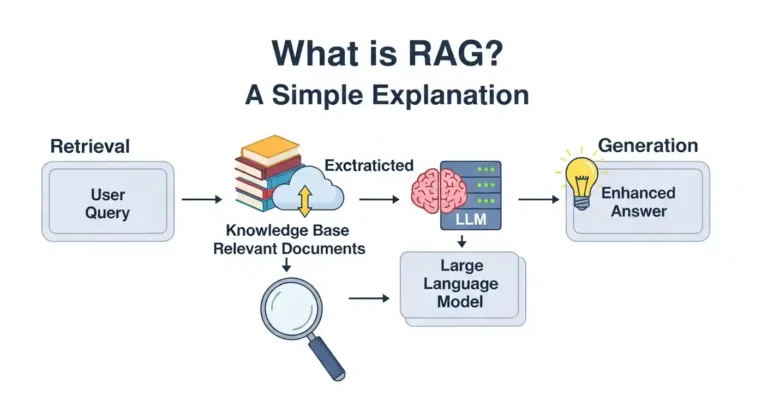
If you want to build your own AI? Not just use ChatGPT, but actually create one? I’ve been there, and let me tell you, it’s easier than you think if you follow the right path. Let me break it down into 5 clear steps that actually work. Learn the Basics Before you touch any code, you need to understand what you’re building. Understand: Easiest start: Take a beginner course (Udemy / Coursera / free YouTube). Look, I know “learn the basics” sounds boring, but trust me, skipping this is like trying to build a house without knowing what a hammer is. You don’t need a PhD, just solid foundations. Spend 2-3 weeks here. Watch videos during breakfast, code during lunch breaks, and practice in the evening. The goal isn’t perfection, it’s understanding enough not to feel lost in the next steps. My recommendation: For Python + PyTorch, there are tons of free YouTube crash courses that’ll get you up to speed fast. Choose a Base Model Here’s where beginners waste months: trying to train everything from zero. Instead of building everything manually: Training from scratch is expensive; fine-tuning is smarter. Think of it like cooking. You wouldn’t grow wheat from seeds to make bread, right? You’d buy flour and bake. Same logic here—start with a pretrained model and customize it. I started with LLaMA 2 7B because it runs on consumer GPUs. Check your hardware first: Pro tip: Hugging Face is your best friend. Browse their model hub, read the model cards, and pick one that fits your use case. Prepare Your Dataset Your AI is only as good as the data you feed it. Garbage in = garbage out. Steps: Example format: This step takes longer than you think. I spent 60% of my time just cleaning data on my first project. Remove broken text, fix encoding issues, filter out junk. Where to get data: Quality > Quantity. 1,000 high-quality examples beat 100,000 messy ones. Fine-Tune the Model This is where the magic happens. This is where your AI becomes yours. Use techniques like: Process: This is where your AI becomes yours. Here’s what actually happens: You take that base model and teach it your specific style, knowledge, or task. Want an AI that writes like you? Fine-tune it on your writing. Want a customer support bot? Fine-tune it on support conversations. Tools I use: Real talk: Your first fine-tuning will probably give weird results. That’s normal. Tweak your hyperparameters, adjust your dataset, try again. I went through 7 iterations before I got something decent. Watch for: Test, Deploy, and Iterate You’ve got a fine-tuned model. Now what? Test it thoroughly: Deploy it: Keep improving: The Harsh Truths Nobody Mentions Let me keep it real with you: Hardware matters. You’ll need a decent GPU or cloud credits. Google Colab free tier works for learning, but you’ll outgrow it fast. Budget $50-200/month for serious work. It will break. A lot. Out of memory errors, CUDA crashes, and weird tokenization issues. Google the error, check GitHub issues, ask in Discord communities. Everyone goes through this. Your first model will be underwhelming. It’ll be slow, give mediocre outputs, and you’ll wonder if you did something wrong. You probably didn’t—this is just part of the process. Data preparation is 70% of the work. Accept this now and save yourself frustration later. Resources to Get You Started Learning: Communities: Tools: Final Thoughts Building your own AI isn’t as scary as it sounds. Yes, there’s a learning curve. Yes, you’ll hit obstacles. But the feeling when you type something into your own AI and it responds intelligently? Absolutely worth it. A year ago, I couldn’t code. Now I’ve built and deployed three custom LLMs. If I can do it, you definitely can.

Simple 5-Step Roadmap to Build Your Own Generative AI Read More »

Generative AI

What is Generative AI?

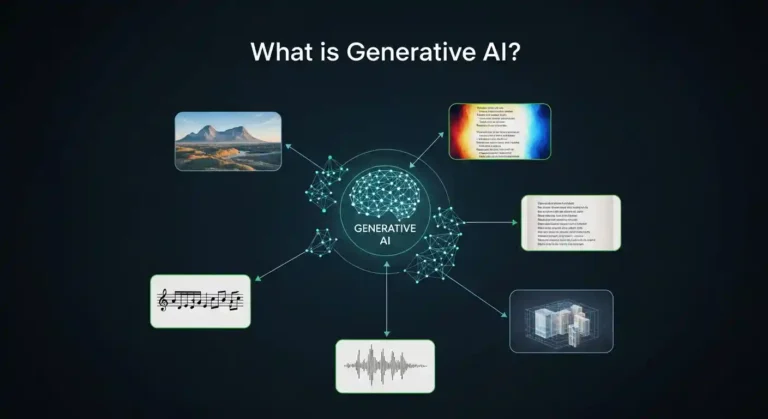
In this articlal i will give a brief explanation of what generative AI is and has quickly become one of the most essential technological shifts of our time. From chatbots that hold surprisingly natural conversations to tools that generate artwork, music, and code in seconds, this technology is reshaping how we create, work, and interact with machines. But beneath the hype, an important question remains: what exactly is generative AI, and why does it matter so much these days? Understanding Generative AI At its core, generative AI refers to artificial intelligence systems designed to create new content. This content can take many forms, such as text, images, audio, video, or software code. Unlike traditional AI systems, which focus on classification, prediction, or decision-making, generative AI produces outputs that did not previously exist. To put it simply:A traditional AI system might identify whether an image contains a cat or a dog. A generative AI system can create an entirely new image of a cat, one that has never existed before, based on what it has learned about how cats generally look. The difference between traditional AI and generative AI is like the difference between a critic and an artist. One evaluates what already exists; the other creates something new. How Does Generative AI Work? Generative AI systems learn by analyzing massive amounts of data. During training, they study patterns, structures, and relationships within this data—learning the “rules” of language, images, sound, or code. Modern generative AI models rely heavily on deep learning techniques. For text generation, architectures like transformers allow models to understand context and relationships between words across long passages. For images, diffusion models learn how to gradually transform random noise into coherent, realistic visuals. A helpful analogy is language learning. If someone reads millions of books, they eventually internalize grammar, tone, and style well enough to write original sentences. Generative AI works similarly—except it does so at an unimaginable scale. An easy way to start is to take a course from Udemy or Coursera, download models from Hugging Face, prepare a dataset, create batches, and train your model. Boom—you’ll have your own generative AI. It’s that simple; there’s no need to build everything manually. Real-World Applications Generative AI is no longer experimental; it’s already embedded in real workflows across industries. Writers use AI tools to brainstorm ideas, overcome writer’s block, and draft content. Designers generate visual concepts in minutes instead of days. Developers rely on AI coding assistants to write, refactor, and debug code faster. Musicians experiment with AI-generated melodies and harmonies as creative inspiration. In business, generative AI is used to draft marketing copy, summarize documents, generate reports, and create synthetic data for testing. In education, it supports personalized learning and tutoring. In healthcare, researchers are exploring its potential for drug discovery and medical imaging analysis. Across all these fields, one theme is consistent: generative AI is becoming a creative partner rather than just a tool. The Opportunities Ahead The promise of generative AI lies in its ability to amplify human creativity and productivity. It reduces friction in the creative process, handles repetitive tasks, and provides instant access to knowledge and ideas. People without formal design training can create professional-quality visuals. Individuals with limited programming experience can build functional applications. Teams can prototype ideas in hours instead of weeks. By lowering barriers to entry, generative AI is democratizing creation. It enables rapid experimentation and allows more people to turn ideas into reality, faster and with fewer resources than ever before. The Challenges We Can’t Ignore Despite its potential, generative AI comes with serious considerations. These systems can produce content that sounds confident but is factually incorrect. Questions around copyright, attribution, and the use of training data remain unresolved. There are also valid concerns about misuse, such as misinformation, impersonation, and deepfakes. Additionally, generative AI raises questions about the future of work, particularly in creative and knowledge-based professions. While many experts believe it will augment rather than replace human roles, the transition will require adaptation, reskilling, and thoughtful policy decisions. The real question isn’t whether generative AI will change society; it’s how responsibly we guide that change.

What is Generative AI? Read More »

django-tenants

Building Enterprise-Grade SaaS with Django

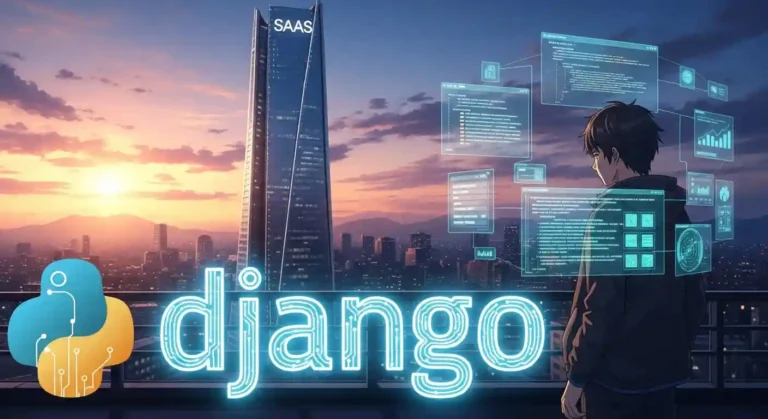
Very few know how to build a SaaS platform that safely serves hundreds or thousands of companies from a single system. The difference is not features. It is architecture. In this article, I will focus on one critical concept used by real SaaS platforms: schema-based multi-tenancy using Django and PostgreSQL. This guide is intentionally minimal and educational.No advanced tooling. No distractions. Just the core ideas Why Multi-Tenancy Is Fundamental to SaaS Imagine you are building a project management product. You onboard 200 companies. Do you: That approach quickly becomes impossible. A SaaS platform must: This is exactly what multi-tenancy provides. The Three Ways to Implement Multi-Tenancy 1. Shared Tables with Tenant ID All tenants share the same tables. Data is filtered using a tenant_id column. This is simple, but dangerous.A single missing filter can expose data across tenants. This approach does not scale safely. 2. Shared Database, Separate Schemas (Recommended) Each tenant gets: Django connects to the correct schema per request. This gives: This article focuses on this approach. 3. Separate Database per Tenant Each tenant has a dedicated database. This offers maximum isolation but adds major operational complexity.Most SaaS platforms do not need this. Why Schema-Based Multi-Tenancy Works Isolation at the Database Level Schemas are enforced by PostgreSQL itself. Even if the application code is incorrect, the database prevents cross-tenant access.Security does not depend on developer discipline. Scales Without Rewrites You can: The architecture remains stable as the business grows. Django Code Remains Clean You write normal Django queries: Django-tenants ensures the query runs in the correct schema automatically. No tenant_id fields everywhere.No custom query filters. How Tenant Resolution Works A simplified request flow: Every request is isolated by default. Data Layout Strategy Public Schema Contains platform-level data: This answers the question: who is the customer? Tenant Schemas Each tenant schema contains: This answers the question: what belongs to this company? Essential Libraries This blog intentionally uses only the core requirements. Django The main web framework. django-tenants Handles: PostgreSQL Driver Required for PostgreSQL schema support. Essential Commands Run shared (public schema) migrations: Run migrations for all tenant schemas: Create a tenant: Create a superuser: Common Mistakes Beginners Make Most of these mistakes appear only after the system grows. Final Thoughts Enterprise SaaS is not about complexity.It is about correct boundaries. Schema-based multi-tenancy gives you: With just Django, django-tenants, and PostgreSQL, you can build a foundation capable of serving real businesses safely. Everything else can be added later. Architecture, however, is very hard to fix later. Build it right from day one. If you want next, I can: Just tell me the next chapter. Why This Matters Schema-based multi-tenancy relies on hostnames to resolve tenants.The domain resolution and middleware logic treat localhost them 127.0.0.1 as different hosts. In development, tenant routing and schema switching are configured to work with localhost. Accessing the app via 127.0.0.1 bypasses this logic, causing tenant resolution to fail.

Building Enterprise-Grade SaaS with Django Read More »

Master Python by Building 8 Classic Games

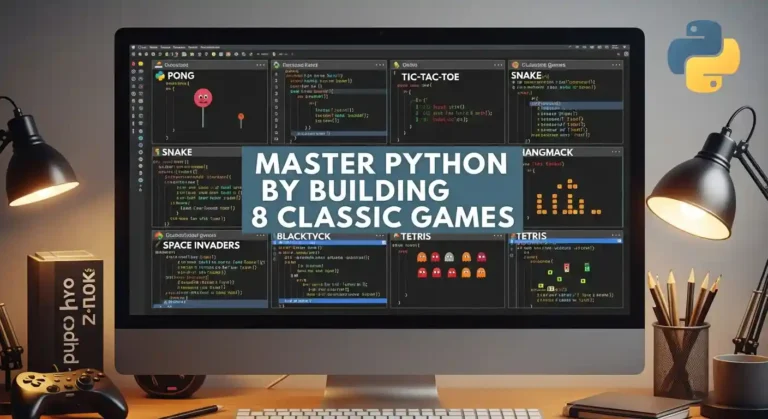
Learning Python by building games is one of the most effective ways to develop real programming skills. Each game teaches specific concepts while keeping you engaged and motivated. This roadmap will guide you from a beginner to a confident Python developer. Solutions will not be provided directly—you are encouraged to struggle, think, and build your own logic. This is where real learning happens. Avoid using AI to solve the problems; do it yourself to truly master Python. 1. Hangman What it teaches: String manipulation, lists, loops, basic I/O The game: Player guesses letters to reveal a hidden word. Each wrong guess adds a body part to the hangman. Six wrong guesses = game over. How to start: Key hint: Store the display as a list of characters, making it easy to reveal letters: [‘_’, ‘_’, ‘t’, ‘_’, ‘o’, ‘_’] 2. Rock Paper Scissors What it teaches: Random module, dictionaries for logic, game loops The game: Player picks rock, paper, or scissors. The computer picks randomly. Winner determined by classic rules. How to start: Key hint: Use a dictionary to encode what each choice beats instead of nested if-statements. This makes adding Lizard and Spock trivial. 3. Quiz Game What it teaches: Lists of dictionaries, file I/O, data organization The game: Present multiple-choice questions, track correct answers, show final score, and percentage. How to start: Key hint: Use a list of dictionaries to store questions. Later, read from a JSON file for easy question management. 4. Blackjack (21) What it teaches: Classes, complex state management, multiple functions The game: Get closer to 21 than the dealer without going over. Aces count as 1 or 11. Dealer hits to 16, stands on 17+. How to start: Key hint: Handle aces by starting them as 11, then converting to 1 if the hand busts. Use a function to calculate hand value. 5. Tic-Tac-Toe What it teaches: 2D lists, pattern checking, basic AI The game: Two players alternate placing X and O on a 3×3 grid. First to get three in a row wins. How to start: Key hint: Check win conditions by examining all rows, then all columns, then two diagonals. For AI, start with random moves, then add logic to block the opponent. 6. Mastermind What it teaches: Counting algorithms, feedback systems, careful logic The game: The computer picks a secret code of 4 colors. Player guesses, gets feedback on exact matches (right color, right position) and partial matches (right color, wrong position). How to start: Key hint: Calculate exact matches first, then count remaining colors that appear in both secret and guess for partial matches. 7. Dice Rolling Game (Yahtzee) What it teaches: Counter class, scoring logic, categorization The game: Roll 5 dice, choose which to keep, re-roll others (up to 3 rolls). Score based on combinations: three of a kind, full house, straight, etc. How to start: Key hint: Use collections.Counter to count dice values. Each scoring rule is a separate function that takes the dice list. 8. Battleship What it teaches: Multiple grids, coordinate systems, validation, and hidden information The game: Player and computer each place ships on a 10×10 grid. Take turns guessing coordinates to sink the opponent’s ships. How to start: Key hint: Use separate grids for the player’s board, the computer’s board, and tracking guesses. Convert input like “B4” to coordinates: row = ord(‘B’) – ord(‘A’), col = 3. Quick Start Guide Project Order Recommendation Beginner: Start with Hangman → Rock Paper Scissors → Quiz Game Intermediate: Tic-Tac-Toe → Mastermind → Blackjack Advanced: Dice Game → Battleship By the time you complete all eight games, you’ll have solid Python fundamentals and a portfolio of working projects. Now pick your first game and start coding!

Master Python by Building 8 Classic Games Read More »

Make Your Personal Blog Website with Wagtail CMS

So I’ve been wanting to build my own blog for a while now, and after trying out a bunch of different platforms like WordPress and some CMSs, I finally found Wagtail. And honestly? It’s been pretty great. Let me tell you why I think Wagtail is perfect for a personal blog and how you can get started with it. Why I Chose Wagtail I know what you’re thinking: “There are like a million blogging platforms out there—why Wagtail?” Fair question. Here’s the thing: I wanted something flexible enough to customize, but not so complicated that I’d spend weeks just setting it up. Wagtail is very easy to set up and customize with templates, but you still get the power and flexibility you need. And Wagtail is 10x faster than a WordPress website, and because it has much batter seo feature It’s built on Django, which I already have some experience with, and it provides a really clean admin interface that doesn’t feel like it was designed in 2005. Plus, it’s open source, which means no monthly fees eating into my coffee budget. What You’ll Need Before we dive in, here’s what you should have ready: Getting Started Alright, let’s actually build this thing. First, I recommend setting up a virtual environment because you don’t want to mess up your system Python packages. Now install Wagtail: Once that’s done, create your project: That last command will ask you to create an admin account. Don’t forget those credentials – you’ll need them to log into your admin panel. Now fire it up: Go to http://127.0.0.1:8000 And boom – you’ve got a Wagtail site running. The admin panel is at http://127.0.0.1:8000/admin. Setting Up Your Blog Here’s where it gets fun. Wagtail is all about creating custom page types. For a blog, you’ll want to create models for your blog index page and individual blog posts. Create a new app for your blog: Then add it to your INSTALLED_APPS settings file. In your blog/models.py, you’ll want something like this: Run migrations again: Creating Templates Wagtail needs templates to display your pages. Create a blog/templates/blog directory and add your templates there. Here’s a simple one for blog_page.html: Adding Some Style The default Wagtail setup is pretty bare-bones, which is actually good because you can style it however you want. I added some basic CSS to make mine look decent, and I’m planning to customize it more as I go. You can put your CSS in a static folder and link it in your base template. Nothing fancy is needed unless you want to get fancy. What I Like About This Setup After using this for my own blog, here’s what I appreciate: The admin interface is actually pleasant to use. I can draft posts, schedule them, and manage everything without wanting to throw my laptop out the window. The StreamField feature (which I didn’t cover here, but you should definitely look into) lets you create really flexible page layouts. And since it’s Django under the hood, I can add any custom functionality I want. A Few Gotchas It’s not all sunshine and rainbows, though. The learning curve is steeper than something like WordPress if you’re not familiar with Python or Django. And while the documentation is pretty good, sometimes you’ll need to dig around to figure out how to do something specific. Also, deployment is on you. Wagtail doesn’t come with hosting, so you’ll need to figure that out yourself. I ended up using a simple VPS, but there are easier options like PythonAnywhere or Heroku if you don’t want to deal with server management. Final Thoughts Building a blog with Wagtail has been a really good experience for me. It’s given me way more control than I’d get with a typical blogging platform, and I actually understand how everything works. If you’re comfortable with Python and want a blog that you can customize to your heart’s content, I’d definitely recommend giving Wagtail a shot.

Make Your Personal Blog Website with Wagtail CMS Read More »

Top 20 SQL Interview Questions and Answers

SQL (Structured Query Language) remains one of the most in-demand skills for data analysts, database administrators, and backend developers. Whether you’re preparing for your first technical interview or brushing up on fundamentals, these 20 questions cover the essential concepts you’re likely to encounter. 1. What is SQL, and what are its different types? SQL is a standardized programming language used for managing and manipulating relational databases. There are several types of SQL commands: 2. What is the difference between DELETE and TRUNCATE? DELETE is a DML command that removes rows one at a time and logs each deletion, allowing you to use a WHERE clause to delete specific rows. It can be rolled back, and triggers are activated. TRUNCATE is a DDL command that removes all rows from a table at once without logging individual row deletions. It’s faster, cannot be rolled back (in most databases), doesn’t activate triggers, and resets identity columns. 3. Explain the different types of JOINs in SQL 4. What are a Primary Key and a Foreign Key? A Primary Key uniquely identifies each record in a table. It cannot contain NULL values, and each table can have only one primary key (which can consist of single or multiple columns). A Foreign Key is a column or set of columns in one table that references the primary key in another table. It establishes relationships between tables and helps maintain referential integrity. 5. What is the difference between WHERE and HAVING clauses? WHERE is used to filter rows before grouping occurs and cannot be used with aggregate functions. It works with individual rows. HAVING is used to filter groups after the GROUP BY clause has been applied and can be used with aggregate functions. For example, WHERE filters employees before calculating department averages, while HAVING filters departments after calculating those averages. 6. Explain SQL indexes and their types Indexes are database objects that improve query performance by providing faster data retrieval. Types include: 7. What is normalization, and what are its types? Normalization is the process of organizing data to reduce redundancy and improve data integrity. The normal forms are: 8. What are aggregate functions in SQL? Aggregate functions perform calculations on a set of values and return a single value. Common ones include COUNT (counts rows), SUM (adds numeric values), AVG (calculates average), MAX (finds maximum value), MIN (finds minimum value), and GROUP_CONCAT or STRING_AGG (concatenates strings from multiple rows). 9. What is a subquery, and what are its types? A subquery is a query nested inside another query. Types include: 10. Explain the difference between UNION and UNION ALL UNION combines result sets from multiple SELECT statements and removes duplicate rows, requiring additional processing. UNION ALL also combines result sets but keeps all rows, including duplicates, making it faster. Both require the same number of columns with compatible data types in the same order. 11. What are constraints in SQL? Constraints enforce rules on data in tables. Common ones include: 12. What is the difference between RANK, DENSE_RANK, and ROW_NUMBER? These are window functions used for ranking. ROW_NUMBER assigns unique sequential numbers (1, 2, 3, 4…) regardless of duplicates. RANK assigns the same rank to ties but skips subsequent ranks (1, 2, 2, 4…). DENSE_RANK assigns the same rank to ties without skipping ranks (1, 2, 2, 3…). 13. Explain transactions and ACID properties A transaction is a logical unit of work containing one or more SQL statements. ACID properties ensure reliable processing: 14. What is the difference between CHAR and VARCHAR? CHAR is a fixed-length data type that always uses the specified amount of storage, padding with spaces if necessary. It’s faster for fixed-length data. VARCHAR is a variable-length data type that uses only the space needed for the actual data plus overhead bytes. It’s more storage-efficient for varying lengths. 15. What are views in SQL? A view is a virtual table based on a SQL query. It doesn’t store data itself but displays data from one or more tables. Views simplify complex queries, provide security by restricting access to specific data, present data in different formats, and maintain logical data independence. Views can be either updatable or read-only, depending on their complexity. 16. Explain the GROUP BY clause GROUP BY groups rows with the same values in specified columns into summary rows. It’s typically used with aggregate functions to perform calculations on each group. For example, grouping sales by region to calculate total sales per region, or grouping employees by department to count employees per department. 17. What is a stored procedure, and what are its advantages? A stored procedure is a prepared SQL code that you can save and reuse. Advantages include improved performance through precompilation, reduced network traffic, enhanced security through access control, code reusability, easier maintenance, and the ability to encapsulate complex business logic. 18. What are triggers in SQL? Triggers are special stored procedures that automatically execute when specific events occur in a database. Types include BEFORE triggers (execute before an operation), AFTER triggers (execute after an operation), and INSTEAD OF triggers (replace the operation). They’re used for enforcing business rules, maintaining audit trails, validating data, and synchronizing tables. 19. Explain the difference between clustered and non-clustered indexes A clustered index determines the physical order of data storage in the table, meaning the table data is sorted according to the clustered index key. Only one clustered index can exist per table. A non-clustered index creates a separate structure that contains the indexed columns and a pointer to the actual data row. Multiple non-clustered indexes can exist on a table. 20. What is a CTE (Common Table Expression)? A CTE is a temporary named result set that exists within the scope of a single statement. Defined using the WITH clause, CTEs improve query readability, can be referenced multiple times in the same query, and support recursion. They’re useful for breaking down complex queries, performing recursive operations such as those found in organizational hierarchies, and making code more maintainable. Final

Top 20 SQL Interview Questions and Answers Read More »

What is a Vector Database

What is a Vector Database & How Does it Work?

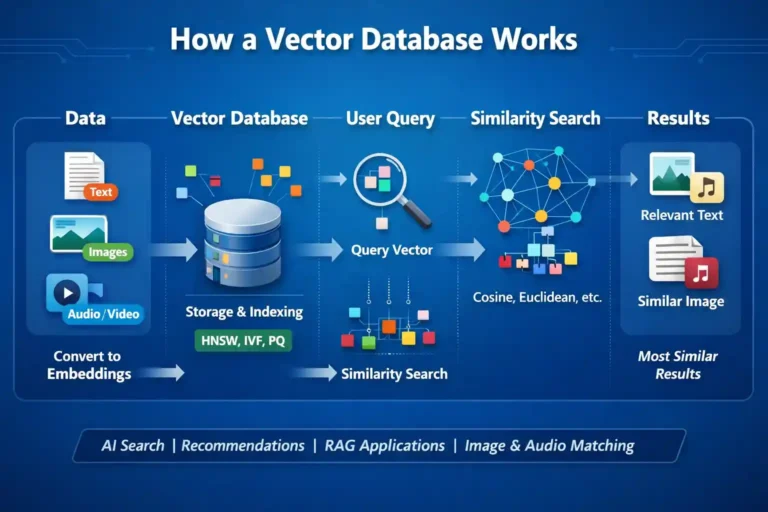
I’ve been diving deep into the world of AI and machine learning lately, and one technology that keeps popping up everywhere is vector databases. At first, I’ll admit, the concept seemed pretty abstract and technical. But once I understood what they actually do and why they matter, everything clicked. So let me break it down for you in the simplest way I can. The Problem Vector Databases Solve Think about how traditional databases work. You store data in rows and columns, and when you want to find something, you search for exact matches or use filters. If I’m looking for a customer named “John Smith,” the database finds exactly that name. Simple, right? But here’s where it gets interesting. What if you want to find things that are similar but not identical? What if you’re building an AI application that needs to understand meaning, context, and relationships between data? Traditional databases aren’t built for that. That’s where vector databases come in. What Exactly is a Vector Database? A vector database is a specialized type of database designed to store and search through high-dimensional vectors. Now, I know “high-dimensional vectors” sounds intimidating, but stick with me. A vector is essentially just a list of numbers that represents something. Think of it as coordinates in space, but instead of just X and Y (like on a map), you might have hundreds or even thousands of dimensions. These numbers capture the “essence” or “meaning” of data. For example, the word “dog” might be represented as a vector like [0.2, -0.5, 0.8, 0.1, …] with hundreds of numbers. The word “puppy” would have a similar but slightly different vector because the meanings are related. How Does It Actually Work? Let me walk you through the process: Step 1: Converting Data into Vectors First, you need to transform your data into these numerical vectors. This is done using something called an embedding model. Whether it’s text, images, audio, or even video, the embedding model converts it into a vector that captures its semantic meaning. I like to think of this as translating everything into a universal language that computers can understand and compare. Step 2: Storing the Vectors Once you have these vectors, they’re stored in the vector database along with any associated metadata (like the original text, IDs, timestamps, whatever you need). The database organizes these vectors in a way that makes searching through millions of them incredibly fast. Step 3: Similarity Search Here’s where the magic happens. When you want to find something, you convert your query into a vector using the same embedding model. Then the database finds the vectors that are closest to your query vector in that high-dimensional space. The “closeness” is measured using mathematical distance metrics like cosine similarity or Euclidean distance. Vectors that are close together represent semantically similar things. Why This Matters for AI Applications I’ve seen vector databases become essential for modern AI applications. Here’s why: Semantic Search: Instead of just matching keywords, you can search based on meaning. If someone searches for “happy puppy,” they might get results about “joyful dogs” even though the exact words don’t match. Recommendation Systems: Vector databases can find similar products, movies, or content based on what users have liked before. Netflix and Spotify rely heavily on this kind of technology. RAG (Retrieval Augmented Generation): This is huge for AI chatbots and assistants. When you ask a question, the system uses a vector database to quickly find relevant information from a knowledge base, then feeds that to a language model to generate an accurate answer. Image and Face Recognition: Finding similar images or identifying faces works brilliantly with vector databases because visual features can be captured as vectors. Popular Vector Databases If you’re thinking about using one, here are some options I’ve come across: The Bottom Line Vector databases aren’t just another database trend. They’re solving a fundamental problem in how we search and understand unstructured data. As AI continues to evolve, the ability to quickly find semantically similar information becomes more and more critical. For me, understanding vector databases opened up a whole new way of thinking about data. Instead of exact matches and rigid schemas, we’re now working with meaning and context. And honestly? That’s pretty exciting. If you’re building anything with AI, especially if it involves search, recommendations, or working with large language models, I’d definitely recommend getting familiar with vector databases. They’re becoming as fundamental to AI applications as traditional databases are to web applications.

What is a Vector Database & How Does it Work? Read More »

9 Python Skills That’ll Get You Hired in 2026

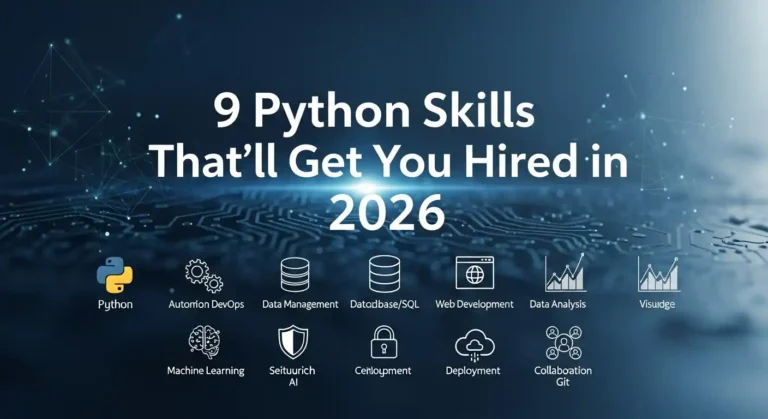
The Python job market has changed—and fast. Companies don’t care how many certificates you’ve collected. They care about one thing only: can you build real, production-ready systems? If you’re serious about getting hired in 2026, these are the Python skills that actually matter. 1. Building Production-Ready APIs (FastAPI & DRF) Forget outdated Flask tutorials. Modern companies expect you to: Bonus points if you understand: If you can do this well, you’re already ahead of most applicants. 2. Data Engineering & Scalable Data Pipelines Everyone learned pandas during the pandemic. Now companies need engineers who can move and transform data at scale. Key skills: This is one of the fastest-growing Python career paths right now. 3. Applied AI & LLM Integration You don’t need a PhD to work in AI. If you can: …you’re extremely valuable. Companies don’t need AI theory—they need AI products that ship. 4. Docker, CI/CD & Production Deployment Code that only works on your laptop doesn’t count. You should know: This is what separates hobby projects from real systems. 5. SQL, Databases & Caching Not glamorous—but incredibly powerful. Many Python developers can’t write a proper JOIN. You should be comfortable with: Mastering databases alone can double your value. 6. Testing, Linting & Code Quality Companies are done with “it works on my machine.” Professional Python means: Boring? Maybe.But this is what pros do. 7. Cloud Fundamentals (Pick One and Go Deep) You don’t need to master every cloud. Pick one: Serverless tools like Zappa or Chalice are big bonuses. 8. Async Python & Performance Optimization Speed matters. You should understand: Developers who make systems faster are always in demand. 9. Data Visualization & Developer Demos Stakeholders love visuals. Beyond pandas, learn: Clear visuals turn engineers into decision-makers. Quick Start Paths (Choose One) If you’re starting, don’t overthink it: Pick a path.Build something real.That’s how you get hired in 2026

9 Python Skills That’ll Get You Hired in 2026 Read More »

demo project netflix

Can Google Antigravity Replace a Junior Developer?

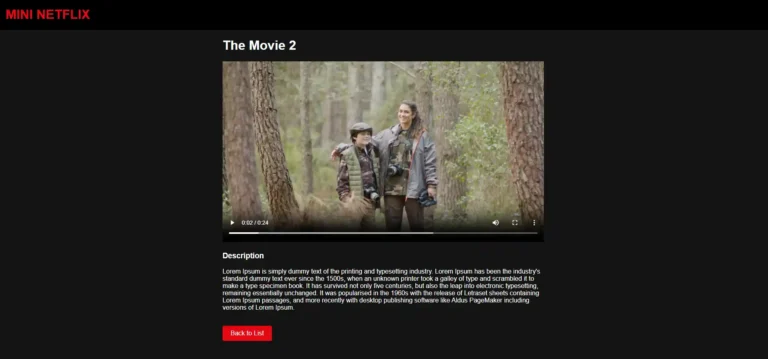
I recently built a Netflix clone without writing most of the code myself. Before you close this tab thinking I’m advocating for replacing human developers, hear me out. This experience with Google Antigravity taught me something nuanced about AI development tools and the future of junior developers. My Experiment: Building Without Coding Using Google Antigravity, I created a functional Netflix clone complete with a Django backend and a Simple frontend. I simply prompted Antigravity to add apps in Django, generate the frontend components, handle the backend logic, and tie everything together. The result? A working application that would have taken me an hour to build manually was ready in just 5 minutes. So, Can Google Antigravity Replace Junior Developers? The short answer: No, but it’s complicated. Here’s what I learned from this experiment: What Google Antigravity Excels At First, you need to grant permission for him to control the Chrome browser and the terminal. Even if you provide a token, he will be able to push code to the GitHub repository by himself. Speed and boilerplate generation. Antigravity churned out repetitive code, set up project structures, and handled standard CRUD operations faster than any human could. It’s like having a junior developer who never gets tired of writing the same patterns. Pattern recognition. Need a login system? Authentication middleware? Antigravity has seen thousands of implementations and can generate one that follows best practices instantly. Syntax and framework knowledge. The tool knew Django conventions, React patterns, and CSS frameworks without needing to Google documentation every five minutes. What Google Antigravity Struggles With When dealing with complex logic involving multiple apps and API integrations, he has to dry-run the process multiple times to fix issues. Sometimes, this takes too much time for a solution that a human could implement quickly. Debugging complex issues. When things broke in unexpected ways, the AI often suggested generic fixes. Real problem-solving requires human intuition and understanding of how different parts of the system interact. Architecture decisions. Should this be a microservice? How should we structure the database for future scaling? These strategic decisions still need human judgment. Context and trade-offs. The AI doesn’t know your team’s coding standards, your company’s technical debt, or why certain “bad” solutions might actually be the right choice given real-world constraints. The Real Question: What Does This Mean for Junior Developers? Rather than asking “will AI replace junior developers,” we should ask “how will junior developer roles evolve?” Junior Developers Who Will Struggle If your value proposition is purely “I can write boilerplate code and implement straightforward features,” then yes, AI is coming for that work. Typing speed and memorizing syntax were never sustainable differentiators. Junior Developers Who Will Thrive The junior developers who will succeed are those who: My Take: AI as a Force Multiplier After building my Netflix clone, I don’t see AI as a replacement for junior developers. I see it as a tool that raises the bar for what “junior” means. In the past, a junior developer spent months learning syntax, framework basics, and how to set up projects. Now, AI handles much of that grunt work. This means junior developers can (and must) focus on higher-level skills earlier in their careers. The junior developer of the future isn’t someone who can slowly implement a feature spec. It’s someone who can: Conclusion Can AI coding assistants replace a junior developer? Only if that junior developer refuses to evolve. The real opportunity is for junior developers to embrace these tools, level up faster, and focus on the irreplaceable human skills that make great developers great. The Netflix clone I built proves that AI can generate code. But it also proved that without human judgment, context, and problem-solving, code is just a starting point, not a solution. The question isn’t whether AI will replace junior developers. It’s whether junior developers will learn to make AI their superpower.

Can Google Antigravity Replace a Junior Developer? Read More »

10 Python Libraries That Build Dashboards in Minutes

Let me tell you something—I’ve wasted countless hours building dashboards from scratch, wrestling with JavaScript frameworks, and questioning my life choices. Then I discovered these Python libraries, and honestly? My life got so much easier. If you’re a data person who just wants to visualize your work without becoming a full-stack developer, this post is for you. 1. Streamlit I’ll be honest—Streamlit changed everything for me. You literally write Python scripts and get beautiful web apps. No HTML, no CSS, no JavaScript headaches. That’s it. That’s the tweet. Three lines and you’ve got an interactive dashboard. It’s perfect for quick prototypes and sharing models with non-technical stakeholders who just want to click buttons and see results. 2. Dash by Plotly When I need something more production-ready, I reach for Dash. It’s built on top of Flask, Plotly, and React, but you don’t need to know any of that. You just write Python and get gorgeous, interactive dashboards. The learning curve is slightly steeper than Streamlit, but the customization options are incredible. I’ve built entire analytics platforms with this thing. 3. Panel Panel is my go-to when I’m already working in Jupyter notebooks and don’t want to rewrite everything. It works seamlessly with practically any visualization library you’re already using—matplotlib, bokeh, plotly, you name it. What I love is that I can develop right in my notebook and then deploy it as a standalone app. No context switching, no rewriting code. 4. Gradio If you’re doing anything with machine learning models, Gradio is a gift from the tech gods. I’ve used it to demo models to clients, and the “wow factor” is real. You can wrap your model in a UI with literally 3 lines of code. Image classification? Text generation? Audio processing? Gradio handles it all and makes you look like a wizard. 5. Voilà Sometimes I just want to turn my Jupyter notebook into a dashboard without changing a single line of code. That’s where Voilà comes in. It renders your notebook as a standalone web app, hiding all the code cells. I use this all the time for presenting analysis to my team. They get to see the results and interact with widgets, but they don’t have to wade through my messy code. 6. Plotly Express Okay, technically Plotly Express isn’t a dashboard library—it’s a visualization library. But hear me out. The charts it creates are so interactive and beautiful that sometimes you don’t even need a full dashboard framework. I’ve literally built entire reports with just Plotly Express charts embedded in simple HTML. One-liners that create publication-ready visualizations? Yes please. 7. Bokeh Bokeh is for when I need fine-grained control but still want everything in Python. It’s great for creating custom interactive visualizations that feel professional and polished. The server component lets you build full applications, and I’ve used it for real-time monitoring dashboards. It handles streaming data beautifully. 8. Taipy I only recently discovered Taipy, but I’m kicking myself for not finding it sooner. It’s designed specifically for data scientists who need to build production applications. What sets it apart is how it handles scenarios and pipelines. If your dashboard needs to run complex workflows or manage different data scenarios, Taipy makes it surprisingly straightforward. 9. Solara Solara is all about reactive programming—your dashboard automatically updates when your data changes. It’s built on top of React but you never touch JavaScript. I love using this for dashboards that need to feel really responsive and modern. The component-based approach makes it easy to build complex interfaces without losing your mind. 10. Shiny for Python If you’re coming from the R world, as I did, Shiny for Python will feel like coming home. It brings the reactive programming model of R Shiny to Python, and it works beautifully. I appreciate how it encourages you to think about reactivity and state management from the start. The resulting dashboards feel polished and professional. My Honest Take Here’s what I’ve learned after building dashboards with all of these: there’s no “best” library. It depends on what you’re trying to do. The beautiful thing is that they’re all Python. You don’t need to become a web developer to build impressive, interactive dashboards. You just need to know Python and have something interesting to show. So pick one, build something, and stop overthinking it. I spent way too long agonizing over which library to learn first. Just start with Streamlit, you’ll have something running in 10 minutes, and you can always learn the others later. Now go build something cool and show it off. The world needs more data people who can actually visualize their insights.

10 Python Libraries That Build Dashboards in Minutes Read More »

Scroll to Top